Don't miss your chance to take the Fabric Data Engineer (DP-700) exam on us!
Learn moreWe've captured the moments from FabCon & SQLCon that everyone is talking about, and we are bringing them to the community, live and on-demand. Starts on April 14th. Register now
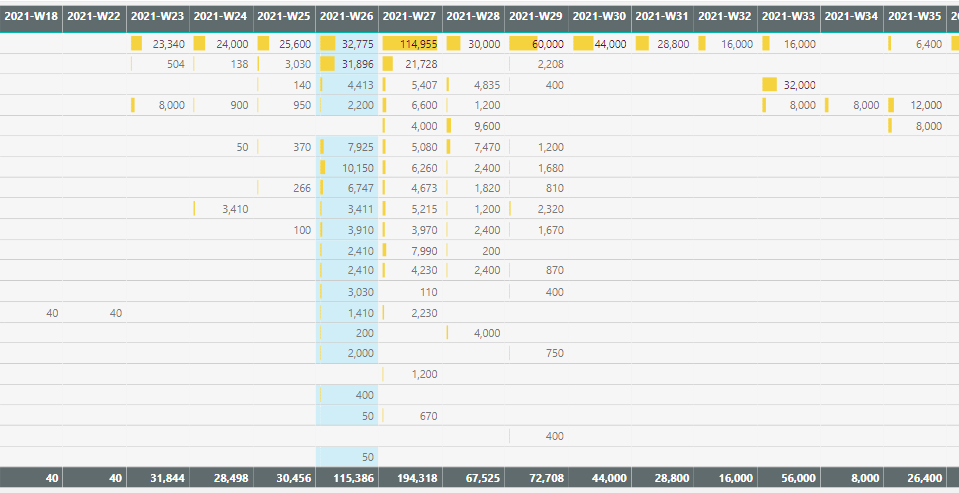
I'd like to highlight date columns in a matrix if they contain today's date. My current solution is to use conditional formatting rules based on a measure that calculates if today falls within the dates selected:
Today in Date Range =
VAR minDate = MIN( 'Calendar'[Date] )
VAR maxDate = MAX( 'Calendar'[Date] )
RETURN
IF( TODAY() >= minDate && TODAY() <= maxDate, 1, 0 )
The problem is that any cells that don't have values don't get conditionally formatted:
The calendar is related to the values by a date field.
Is there a way to do this that also conditionally formats the blanks within that column?
I'd also like this to remain dynamic so it still works if the columns change to different date ranges (days or months).
Solved! Go to Solution.
@emarc1 , Power bi does not color blank rows. I tried a color measure with isblank too.
Try if this can work
Today in Date Range =
VAR minDate = MIN( 'Calendar'[Date] )
VAR maxDate = MAX( 'Calendar'[Date] )
RETURN
IF( TODAY() >= minDate && TODAY() <= maxDate && [measure]+0 <> blank() 1, 0 )
measure is the value you are using in matrix
Hmm, I suspected that might be the case. I did experiment with your code amendments but didn't have any luck. I think the only way to do it would be to replace all blanks with zeroes (in the value measure), which would probably result in performance issues instead. It's a shame, because being able to dynamically highlight certain time periods feels very useful, from a UX perspective.
Thanks for your help.
@emarc1 , Power bi does not color blank rows. I tried a color measure with isblank too.
Try if this can work
Today in Date Range =
VAR minDate = MIN( 'Calendar'[Date] )
VAR maxDate = MAX( 'Calendar'[Date] )
RETURN
IF( TODAY() >= minDate && TODAY() <= maxDate && [measure]+0 <> blank() 1, 0 )
measure is the value you are using in matrix
If you have recently started exploring Fabric, we'd love to hear how it's going. Your feedback can help with product improvements.
A new Power BI DataViz World Championship is coming this June! Don't miss out on submitting your entry.
Share feedback directly with Fabric product managers, participate in targeted research studies and influence the Fabric roadmap.
| User | Count |
|---|---|
| 51 | |
| 37 | |
| 35 | |
| 19 | |
| 17 |
| User | Count |
|---|---|
| 70 | |
| 64 | |
| 39 | |
| 33 | |
| 23 |