We've captured the moments from FabCon & SQLCon that everyone is talking about, and we are bringing them to the community, live and on-demand. Starts on April 14th. Register now
dears,
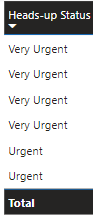
how can I change the colors for this column in my report whenever it changes from one to another (in the below case very Urgent in color1 and Urgent in Color 2 and whenevr i have another status it will be in another color that i'll choose myself for them all)?
thx
Solved! Go to Solution.
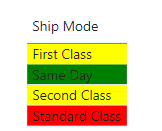
@Zakaria_1980 , a Better way to do it is to create a measure 'Status Color' and add the coloring logic. Refer below,
Status Color = SWITCH(SELECTEDVALUE(Orders[Ship Mode]),"Standard Class", "Red","Same Day","Green","Yellow")Add this measure to conditional formating
@Zakaria_1980 , a Better way to do it is to create a measure 'Status Color' and add the coloring logic. Refer below,
Status Color = SWITCH(SELECTEDVALUE(Orders[Ship Mode]),"Standard Class", "Red","Same Day","Green","Yellow")Add this measure to conditional formating
If you have recently started exploring Fabric, we'd love to hear how it's going. Your feedback can help with product improvements.
A new Power BI DataViz World Championship is coming this June! Don't miss out on submitting your entry.
Share feedback directly with Fabric product managers, participate in targeted research studies and influence the Fabric roadmap.
| User | Count |
|---|---|
| 53 | |
| 38 | |
| 33 | |
| 17 | |
| 17 |
| User | Count |
|---|---|
| 67 | |
| 62 | |
| 38 | |
| 34 | |
| 22 |