This time we’re going bigger than ever. Fabric, Power BI, SQL, AI and more. We're covering it all. You won't want to miss it.
Learn moreLevel up your Power BI skills this month - build one visual each week and tell better stories with data! Get started
My question is related to this question: Solved: Conditional Formatting Duplicate Records in Rows - Microsoft Power BI Community.
Specifically, I want to mark those rows in a visual which are duplicates. However, the answer in that question only works if there is only one duplicate. I can have more than 2, hence to mark when distinct count is 2 will not be sufficient.
How can I achieve this?
Solved! Go to Solution.
Hi @Anonymous ,
I created a sample pbix file(see attachment), please check whether that is what you want.
1. Create a measure as below to get the count of systems which per user logged into
Countofsystem =
CALCULATE (
DISTINCTCOUNT ( 'Table'[System] ),
FILTER (
ALLSELECTED ( 'Table' ),
'Table'[Current User] = SELECTEDVALUE ( 'Table'[Current User] )
)
)
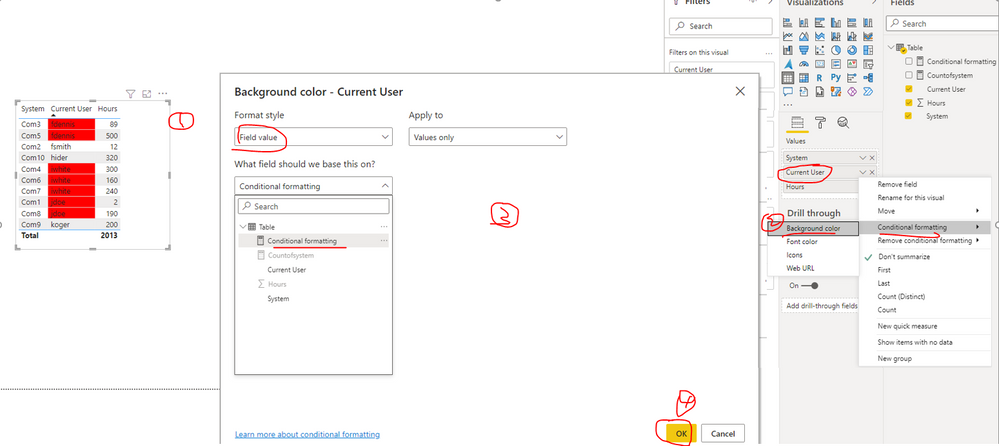
2. Create a measure as below to make conditional formatting rule
Conditional formatting = IF ( [Countofsystem] >= 2, "Red" )
3. Configure conditional formatting: select the visual and click the field "Current User", Conditional formatting-->Background color
Best Regards
Hi @Anonymous ,
I created a sample pbix file(see attachment), please check whether that is what you want.
1. Create a measure as below to get the count of systems which per user logged into
Countofsystem =
CALCULATE (
DISTINCTCOUNT ( 'Table'[System] ),
FILTER (
ALLSELECTED ( 'Table' ),
'Table'[Current User] = SELECTEDVALUE ( 'Table'[Current User] )
)
)
2. Create a measure as below to make conditional formatting rule
Conditional formatting = IF ( [Countofsystem] >= 2, "Red" )
3. Configure conditional formatting: select the visual and click the field "Current User", Conditional formatting-->Background color
Best Regards
Thanks a lot!!! It did work!!!
HI @Anonymous ,
I would suggest creating another column on top of the calculated column suggested in the above solution on the forum:
countFlag =
IF(CountDistinct > 1, 1, 0)
Then use this column for conditional formatting. So, countFlag = 1 is taking into account all the duplicates with count more than 1.
Thanks,
Pragati
Hi @Pragati11
I created the columns as you suggested, however when I go to conditional formatting and select field, I can not select calculated columns.
Could you suggest how to workaround this?
Hi @Anonymous ,
You select the column in conditional formatting in the same way shown in the thread that you used for reference:
https://community.powerbi.com/t5/Desktop/Conditional-Formatting-Duplicate-Records-in-Rows/m-p/690739
Also it is always good to have some screenshots so that I can understand what you have done and trying to do 🙂
Thanks,
Pragati
Check out the April 2026 Power BI update to learn about new features.
Sign up to receive a private message when registration opens and key events begin.
If you have recently started exploring Fabric, we'd love to hear how it's going. Your feedback can help with product improvements.
| User | Count |
|---|---|
| 37 | |
| 32 | |
| 27 | |
| 24 | |
| 17 |
| User | Count |
|---|---|
| 70 | |
| 50 | |
| 31 | |
| 26 | |
| 22 |