cancel
Showing results for 
Search instead for 
Did you mean: 

The Power BI Data Visualization World Championships is back! It's time to submit your entry. Live now!

Reply
TerYeah
Helper I
Helper I

Conditional formatting in highlighted visual

Hi all,

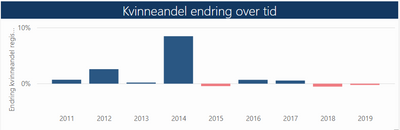
I recently discovered some unexpected behaviour on a simple bar chart visual. The bars are coloured using conditional formatting, so that once the value drops below zero, the bar turns red.

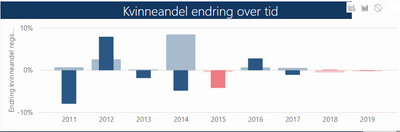
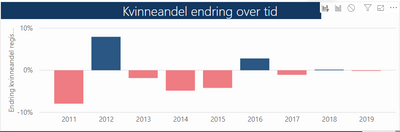
In the same report page there is another visual, in which I can select a value, on which my bar chart is filtered. Still, the formatting works fine. BUT then I changed the interaction mode to highlight, and that's when my bar chart disappointed me - the bars keep their colour based on the original value.


Does anyone know a way to trick this into place?


The unfiltered originalThe unfiltered originalWith highlightWith highlightFilter appliedFilter applied


2 REPLIES 2
v-chuncz-msft
Community Support
Community Support

@TerYeah 


Here is a similar post.

https://community.powerbi.com/t5/Desktop/Is-it-possible-to-change-color-saturation-with-highlighting...

Community Support Team _ Sam Zha
If this post helps, then please consider Accept it as the solution to help the other members find it more quickly.

Ah, look at that! (I swear I did a search before posting!)


It is indeed the same issue, but the "solution" is to post an idea - and the referred idea doesn't seem to exist anymore.

Man Frustrated

Helpful resources

Announcements
Power BI DataViz World Championships

Power BI Dataviz World Championships

The Power BI Data Visualization World Championships is back! It's time to submit your entry.

January Power BI Update Carousel

Power BI Monthly Update - January 2026

Check out the January 2026 Power BI update to learn about new features.

FabCon Atlanta 2026 carousel

FabCon Atlanta 2026

Join us at FabCon Atlanta, March 16-20, for the ultimate Fabric, Power BI, AI and SQL community-led event. Save $200 with code FABCOMM.