cancel
Showing results for 
Search instead for 
Did you mean: 

Learn from the best! Meet the four finalists headed to the FINALS of the Power BI Dataviz World Championships! Register now

Reply
JustinDoh1
Post Prodigy
Post Prodigy

Conditional formatting in Matrix's value

Hi community,


I am sharing my Pbix file here.


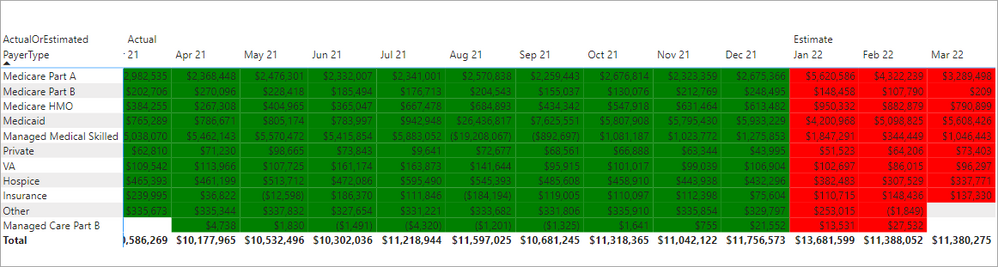
I am trying to apply different Background colors on Matrix.

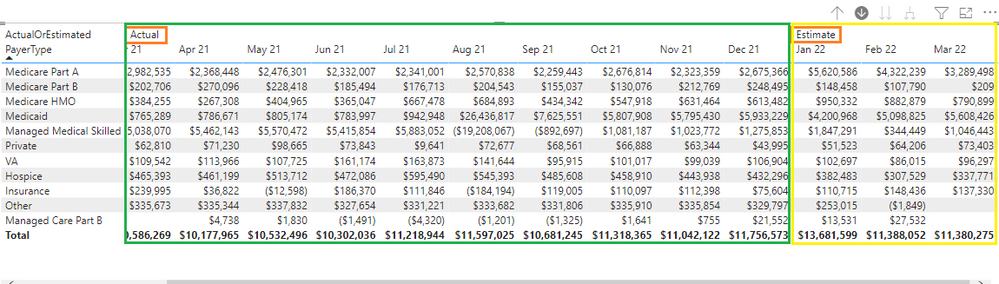
Here is my demo:

JustinDoh1_0-1647981920652.png


Currently, this Matrix has two parts.

Left side is Actual and right three columns are Estimate based on logic.

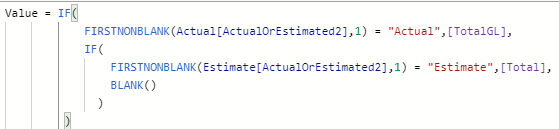
JustinDoh1_1-1647982058553.png


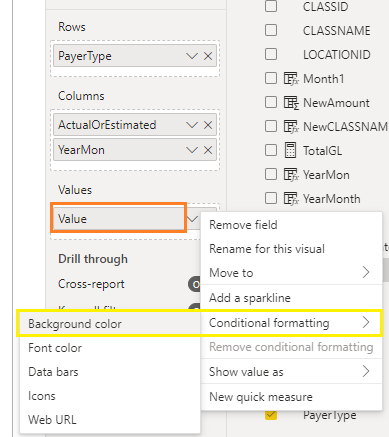
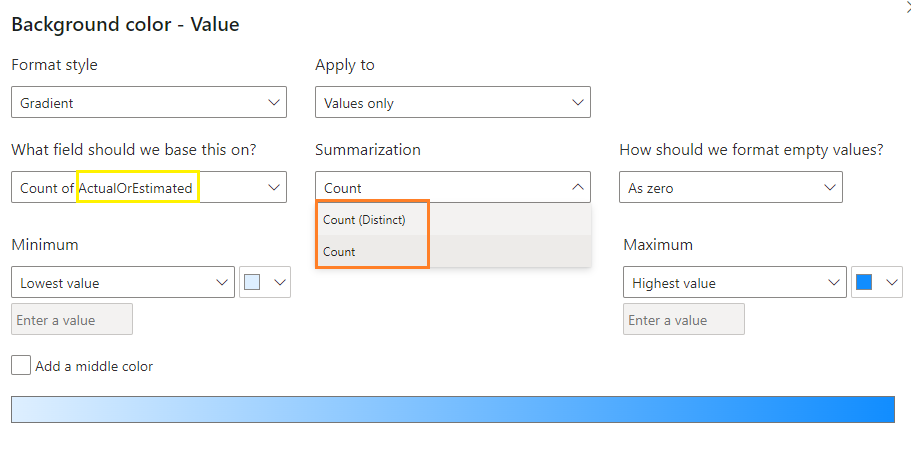
When I try to do the Conditional formating on the Value, it does not give me an option to choose either "Actual" or "Estimate".

It only gives me an option of Count and Distinct Count.

JustinDoh1_3-1647982327835.png


JustinDoh1_2-1647982205252.png

What I am trying to do is apply different background colors on Value depedning output of BudgetType is "Actual" or "Estimte".

How do we go about doing it with current model?


Thank you.


1 ACCEPTED SOLUTION
jdbuchanan71
Super User
Super User

@JustinDoh1 

You can write a measure to check on the BudgetType[ActualOrEstimated] and return a color string like this.


Value Format = 
VAR _Type = SELECTEDVALUE ( BudgetType[ActualOrEstimated] )
RETURN
SWITCH ( 
    TRUE (),
    _Type = "Actual", "Green",
    _Type = "Estimate", "Red"
)


Then apply conditional formatting to the Values background based on the Field value of the measure:

jdbuchanan71_0-1647983196758.png

jdbuchanan71_1-1647983218197.png


You can use color hex values instead also.

Value Format = 
VAR _Type = SELECTEDVALUE ( BudgetType[ActualOrEstimated] )
RETURN
SWITCH ( 
    TRUE (),
    _Type = "Actual", "#34A853",
    _Type = "Estimate", "#EA4335"
)


View solution in original post

2 REPLIES 2
JustinDoh1
Post Prodigy
Post Prodigy

@jdbuchanan71 Excellent! Thank you!

jdbuchanan71
Super User
Super User

@JustinDoh1 

You can write a measure to check on the BudgetType[ActualOrEstimated] and return a color string like this.


Value Format = 
VAR _Type = SELECTEDVALUE ( BudgetType[ActualOrEstimated] )
RETURN
SWITCH ( 
    TRUE (),
    _Type = "Actual", "Green",
    _Type = "Estimate", "Red"
)


Then apply conditional formatting to the Values background based on the Field value of the measure:

jdbuchanan71_0-1647983196758.png

jdbuchanan71_1-1647983218197.png


You can use color hex values instead also.

Value Format = 
VAR _Type = SELECTEDVALUE ( BudgetType[ActualOrEstimated] )
RETURN
SWITCH ( 
    TRUE (),
    _Type = "Actual", "#34A853",
    _Type = "Estimate", "#EA4335"
)


Helpful resources

Announcements
Join our Fabric User Panel

Join our Fabric User Panel

Share feedback directly with Fabric product managers, participate in targeted research studies and influence the Fabric roadmap.

March Power BI Update Carousel

Power BI Community Update - March 2026

Check out the March 2026 Power BI update to learn about new features.