cancel
Showing results for 
Search instead for 
Did you mean: 

The Power BI Data Visualization World Championships is back! It's time to submit your entry. Live now!

Reply
Anonymous
Not applicable

Conditional formatting formula

I want to conditionally format all rows in my table based on the value contained within one column. I know this can be done by creating a dax formula and then applying it to each column separately but I don't know how to write the formula.


COLUMN A has a calculated number in it


I would like help writing the formula for the following:


If the number in COLUMN A is greater than 180, then it should be #f99d9d

If the number in COLUMN A is between 90 and 179, it should be #f9cb9d

If the number in COLUMN A is between 0 and 89, it should be #9df99d


1 ACCEPTED SOLUTION
Greg_Deckler
Community Champion
Community Champion

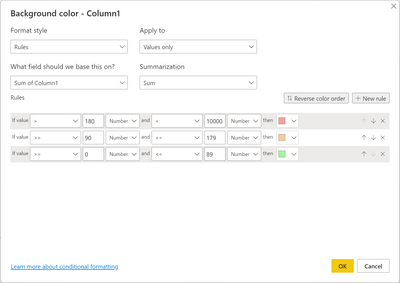
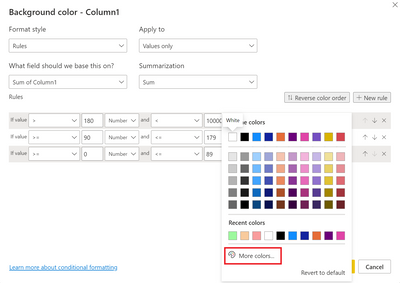
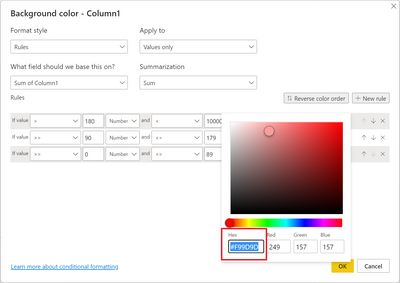
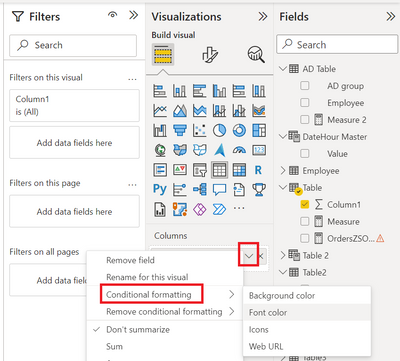
@Anonymous You should just be able to use Conditional formatting for the column configured as the screen shot below. Additional screen shots show how to implement the conditional formatting.

Greg_Deckler_0-1664306813485.pngGreg_Deckler_1-1664306851487.pngGreg_Deckler_2-1664306879157.png

Greg_Deckler_3-1664306922274.png


Follow on LinkedIn
@ me in replies or I'll lose your thread!!!
Instead of a Kudo, please vote for this idea
Become an expert!: Enterprise DNA
External Tools: MSHGQM
YouTube Channel!: Microsoft Hates Greg
Latest book!:
DAX For Humans

DAX is easy, CALCULATE makes DAX hard...

View solution in original post

2 REPLIES 2
Anonymous
Not applicable

Thanks @Greg_Deckler 


I was hoping there was a faster way but I used this approach and it worked just fine.  Thanks again!

Greg_Deckler
Community Champion
Community Champion

@Anonymous You should just be able to use Conditional formatting for the column configured as the screen shot below. Additional screen shots show how to implement the conditional formatting.

Greg_Deckler_0-1664306813485.pngGreg_Deckler_1-1664306851487.pngGreg_Deckler_2-1664306879157.png

Greg_Deckler_3-1664306922274.png


Follow on LinkedIn
@ me in replies or I'll lose your thread!!!
Instead of a Kudo, please vote for this idea
Become an expert!: Enterprise DNA
External Tools: MSHGQM
YouTube Channel!: Microsoft Hates Greg
Latest book!:
DAX For Humans

DAX is easy, CALCULATE makes DAX hard...

Helpful resources

Announcements
Power BI DataViz World Championships

Power BI Dataviz World Championships

The Power BI Data Visualization World Championships is back! It's time to submit your entry.

January Power BI Update Carousel

Power BI Monthly Update - January 2026

Check out the January 2026 Power BI update to learn about new features.

FabCon Atlanta 2026 carousel

FabCon Atlanta 2026

Join us at FabCon Atlanta, March 16-20, for the ultimate Fabric, Power BI, AI and SQL community-led event. Save $200 with code FABCOMM.