Don't miss your chance to take the Fabric Data Engineer (DP-600) exam for FREE! Find out how by watching the DP-600 session on-demand now through April 28th.
Learn moreJoin the FabCon + SQLCon recap series. Up next: Power BI, Real-Time Intelligence, IQ and AI, and Data Factory take center stage. All sessions are available on-demand after the live show. Register now
I want to conditionally format all rows in my table based on the value contained within one column. I know this can be done by creating a dax formula and then applying it to each column separately but I don't know how to write the formula.
COLUMN A has a calculated number in it
I would like help writing the formula for the following:
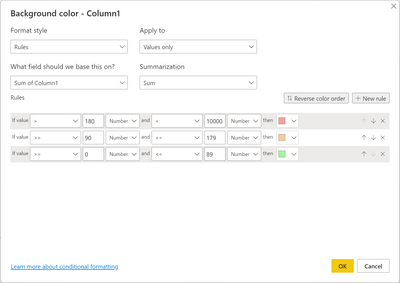
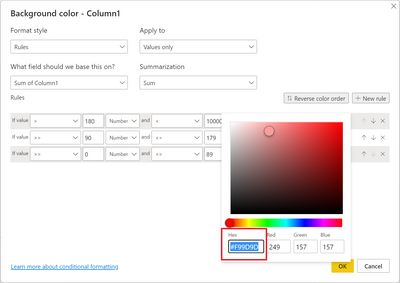
If the number in COLUMN A is greater than 180, then it should be #f99d9d
If the number in COLUMN A is between 90 and 179, it should be #f9cb9d
If the number in COLUMN A is between 0 and 89, it should be #9df99d
Solved! Go to Solution.
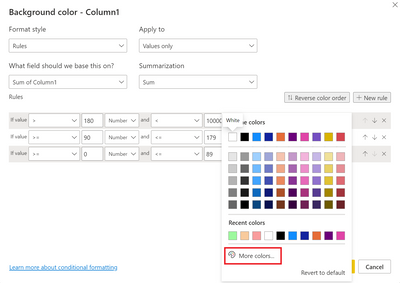
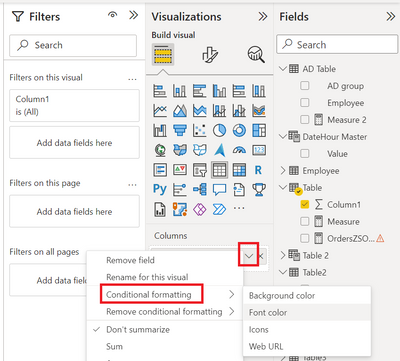
@Anonymous You should just be able to use Conditional formatting for the column configured as the screen shot below. Additional screen shots show how to implement the conditional formatting.
Thanks @Greg_Deckler
I was hoping there was a faster way but I used this approach and it worked just fine. Thanks again!
@Anonymous You should just be able to use Conditional formatting for the column configured as the screen shot below. Additional screen shots show how to implement the conditional formatting.
Check out the April 2026 Power BI update to learn about new features.
If you have recently started exploring Fabric, we'd love to hear how it's going. Your feedback can help with product improvements.
A new Power BI DataViz World Championship is coming this June! Don't miss out on submitting your entry.
| User | Count |
|---|---|
| 45 | |
| 38 | |
| 34 | |
| 21 | |
| 17 |
| User | Count |
|---|---|
| 66 | |
| 65 | |
| 31 | |
| 26 | |
| 26 |