cancel
Showing results for 
Search instead for 
Did you mean: 

The Power BI Data Visualization World Championships is back! Get ahead of the game and start preparing now! Learn more

Reply
Anonymous
Not applicable

Conditional formatting for multiple columns issue - Need Help

Hi Community,


I am new to Power BI. Some one please provide me a solution for the following issue.


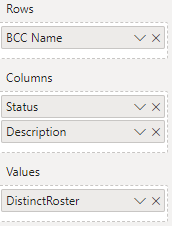
I have a double heading matrix where customers are in Rows, two columns Status and Description are in the columns section (Both columns are from same lookup table), and a measure in the values section which will display the distinct count in the matrix. Following is the DAX.


DistinctRoster:= IF(CALCULATE(DISTINCTCOUNT(FactStatus[RosterId])) = BLANK(), 0, CALCULATE(DISTINCTCOUNT(FactStatus[RosterId])))


The matrix is like

vamsikrishna007_2-1596758771785.png


vamsikrishna007_1-1596758671576.png


Issue: I have to implement background color for column Active placements based on column Placed Duration in Fact table and for column Pending based on  column Pending Duration in fact table.


I added background color for column Active Placements by going to conditional formatting --> Format By rules--> and BAsed on field. It worked great for that column.


vamsikrishna007_3-1596759520708.png


But how i can implement the background color for column Pending? I got stuck at this point.


TIA.


2 ACCEPTED SOLUTIONS
amitchandak
Super User
Super User

@Anonymous , In a matrix you should be able to define a rule for all the columns.


You can create a color measure and use that with "Field" Option

color =
switch ( true(),
FIRSTNONBLANK(Table[commodity],"NA") ="commodity1" && sum(Table[Value]) >500,"lightgreen",
FIRSTNONBLANK(Table[commodity],"NA") ="commodity2" && sum(Table[Value]) >1000,"lightgreen",
/// Add more conditions
"red"
)


Color Field - Color Measure - Conditional formatting
https://radacad.com/dax-and-conditional-formatting-better-together-find-the-biggest-and-smallest-numbers-in-the-column
https://docs.microsoft.com/en-us/power-bi/desktop-conditional-table-formatting#color-by-color-values
https://exceleratorbi.com.au/conditional-formatting-using-icons-in-power-bi/
https://community.powerbi.com/t5/Desktop/FORMAT-icon-set-for-use-in-a-data-card/td-p/811692

Share with Power BI Enthusiasts: Full Power BI Video (20 Hours) YouTube
Microsoft Fabric Series 60+ Videos YouTube
Microsoft Fabric Hindi End to End YouTube

View solution in original post

v-yingjl
Community Support
Community Support

Hi @Anonymous ,

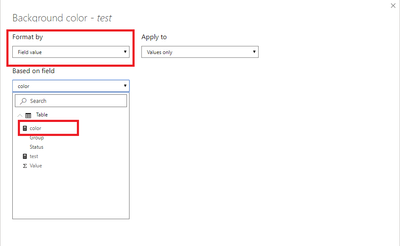
Create a measure like this, choose Field value in the conditonal format page, apply it on the background of the previous measure:

color = 
SWITCH(
    TRUE(),
    SELECTEDVALUE('Table'[Group]) = "A" && 'Table'[test] >=1 && 'Table'[test] <=15, "#1E90FF",
    SELECTEDVALUE('Table'[Group]) = "B" && 'Table'[test] >=1 && 'Table'[test] <=30, "#00FA9A",
    SELECTEDVALUE('Table'[Group]) = "C" && 'Table'[test] >=1 && 'Table'[test] <=45, "#8A2BE2",
    "#FF0000"
)

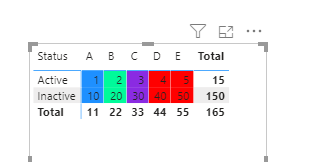
conditional format.pngre.png 


Attached a sample file that hopes to help you: conditional format.pbix


Best Regards,
Yingjie Li

If this post helps then please consider Accept it as the solution to help the other members find it more quickly.


View solution in original post

2 REPLIES 2
v-yingjl
Community Support
Community Support

Hi @Anonymous ,

Create a measure like this, choose Field value in the conditonal format page, apply it on the background of the previous measure:

color = 
SWITCH(
    TRUE(),
    SELECTEDVALUE('Table'[Group]) = "A" && 'Table'[test] >=1 && 'Table'[test] <=15, "#1E90FF",
    SELECTEDVALUE('Table'[Group]) = "B" && 'Table'[test] >=1 && 'Table'[test] <=30, "#00FA9A",
    SELECTEDVALUE('Table'[Group]) = "C" && 'Table'[test] >=1 && 'Table'[test] <=45, "#8A2BE2",
    "#FF0000"
)

conditional format.pngre.png 


Attached a sample file that hopes to help you: conditional format.pbix


Best Regards,
Yingjie Li

If this post helps then please consider Accept it as the solution to help the other members find it more quickly.


amitchandak
Super User
Super User

@Anonymous , In a matrix you should be able to define a rule for all the columns.


You can create a color measure and use that with "Field" Option

color =
switch ( true(),
FIRSTNONBLANK(Table[commodity],"NA") ="commodity1" && sum(Table[Value]) >500,"lightgreen",
FIRSTNONBLANK(Table[commodity],"NA") ="commodity2" && sum(Table[Value]) >1000,"lightgreen",
/// Add more conditions
"red"
)


Color Field - Color Measure - Conditional formatting
https://radacad.com/dax-and-conditional-formatting-better-together-find-the-biggest-and-smallest-numbers-in-the-column
https://docs.microsoft.com/en-us/power-bi/desktop-conditional-table-formatting#color-by-color-values
https://exceleratorbi.com.au/conditional-formatting-using-icons-in-power-bi/
https://community.powerbi.com/t5/Desktop/FORMAT-icon-set-for-use-in-a-data-card/td-p/811692

Share with Power BI Enthusiasts: Full Power BI Video (20 Hours) YouTube
Microsoft Fabric Series 60+ Videos YouTube
Microsoft Fabric Hindi End to End YouTube

Helpful resources

Announcements
Power BI DataViz World Championships

Power BI Dataviz World Championships

The Power BI Data Visualization World Championships is back! Get ahead of the game and start preparing now!

December 2025 Power BI Update Carousel

Power BI Monthly Update - December 2025

Check out the December 2025 Power BI Holiday Recap!

FabCon Atlanta 2026 carousel

FabCon Atlanta 2026

Join us at FabCon Atlanta, March 16-20, for the ultimate Fabric, Power BI, AI and SQL community-led event. Save $200 with code FABCOMM.