cancel
Showing results for 
Search instead for 
Did you mean: 

Vote for your favorite vizzies from the Power BI Dataviz World Championship submissions. Vote now!

Reply
Anonymous
Not applicable

Conditional formatting for a circle

I made below circle by unichar(9898) and unichar(9899) in card visual, however, i would like to make it be a specific color, like blue. I have tried to use the conditional formatting but it seems that it does not work. Each row in my data view have unichar(9898) and unichar(9899) already

aaa.PNG


1 ACCEPTED SOLUTION
AnthonyJoseph
Resolver III
Resolver III

Hi @Anonymous 


I think I get what you are asking... I used UNICHAR(11044) to create circle and change font color.


1) Create a column 'Circle'.

Circle = UNICHAR(11044)

2) Create another column (font color) to determine the color of the circle based on the condition, for example: here I m trying to determine color based on the ID value.


font color = SWITCH(
    TRUE(),
    'Table'[ID] = 0, "#D9291C",
    'Table'[ID]= 1, "#ED8B00",
   'Table'[ID] = 2, "#FFCD00",
   'Table'[ID] = 3, "#A0DCFF",
   'Table'[ID] = 4, "#6FC2B4",
    'Table'[ID] = 5, "#C4D600",
    "#046A38"
)

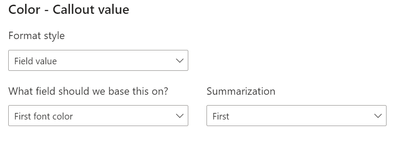
3) Then use the "font color" column in card/any visual i.e.using  font color option and select the function in the Color category. Then choose "Field value" in format style and "first font color" in the below option. Pasted below the screenshot for reference.

AnthonyJoseph_3-1665038968432.png


AnthonyJoseph_0-1665038700822.png

4) Click OK 🙂 and you will be able to see the below color card visual

AnthonyJoseph_2-1665038849801.png

This should work for you as well...


Thanks,

AnthonyJoseph


View solution in original post

3 REPLIES 3
AnthonyJoseph
Resolver III
Resolver III

Hi @Anonymous 


I think I get what you are asking... I used UNICHAR(11044) to create circle and change font color.


1) Create a column 'Circle'.

Circle = UNICHAR(11044)

2) Create another column (font color) to determine the color of the circle based on the condition, for example: here I m trying to determine color based on the ID value.


font color = SWITCH(
    TRUE(),
    'Table'[ID] = 0, "#D9291C",
    'Table'[ID]= 1, "#ED8B00",
   'Table'[ID] = 2, "#FFCD00",
   'Table'[ID] = 3, "#A0DCFF",
   'Table'[ID] = 4, "#6FC2B4",
    'Table'[ID] = 5, "#C4D600",
    "#046A38"
)

3) Then use the "font color" column in card/any visual i.e.using  font color option and select the function in the Color category. Then choose "Field value" in format style and "first font color" in the below option. Pasted below the screenshot for reference.

AnthonyJoseph_3-1665038968432.png


AnthonyJoseph_0-1665038700822.png

4) Click OK 🙂 and you will be able to see the below color card visual

AnthonyJoseph_2-1665038849801.png

This should work for you as well...


Thanks,

AnthonyJoseph


Hi @Anonymous 


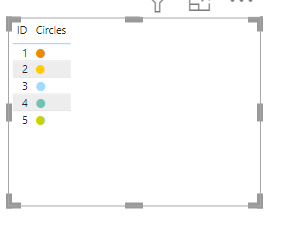
If in case you would want to view as table,  then you can use conditional formatting option in the circle column so that the output looks like:


AnthonyJoseph_4-1665039207506.png


Also you can use any HEX color value (that I have included in the calculated column-"font color" ).

Hope this helps!


Thanks,

AnthonyJoseph


Hi @AnthonyJoseph , i have a similar problem, but I need to decide what color to apply on the circle based on 3 options:

if the value is over 0
if the value is less then 0
if the value is equal to 0

Do you have any tip for me (My visual is a table)??

Helpful resources

Announcements
Power BI DataViz World Championships

Power BI Dataviz World Championships

Vote for your favorite vizzies from the Power BI World Championship submissions!

Sticker Challenge 2026 Carousel

Join our Community Sticker Challenge 2026

If you love stickers, then you will definitely want to check out our Community Sticker Challenge!

January Power BI Update Carousel

Power BI Monthly Update - January 2026

Check out the January 2026 Power BI update to learn about new features.

FabCon Atlanta 2026 carousel

FabCon Atlanta 2026

Join us at FabCon Atlanta, March 16-20, for the ultimate Fabric, Power BI, AI and SQL community-led event. Save $200 with code FABCOMM.