Join us at FabCon Atlanta from March 16 - 20, 2026, for the ultimate Fabric, Power BI, AI and SQL community-led event. Save $200 with code FABCOMM.
Register now!The Power BI Data Visualization World Championships is back! Get ahead of the game and start preparing now! Learn more
trying to work out how i can achieve this and apply a conditional format (new to DAX):
for example two tables:
table 1 table 2
Field 1 Field 1
A 10
B 15
C 10
C 60
A 40
So just need something like this:
if
table1.field 1 = A and table2.field1 <= 10 or table1.field 1 = B and table2.field1 <= 15 or table1.field 1 = C and table2.field1 <= 20 then ' Value 1'
table1.field 1 = A and (table2.field1 > 10 or less than 20) or table1.field 1 = B and (table2.field1 > 15 and less than 30) or table1.field 1 = C and (table2.field1 > 20 and less than 40) then ' Value 2'
else
value 3
i could then apply conditional format based on value 1, 2 or 3
thanks
Solved! Go to Solution.
Hi @cheezy ,
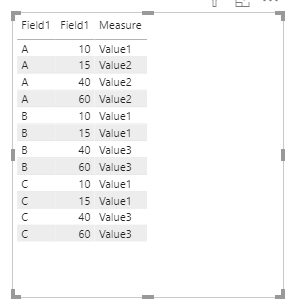
If the two tables only have one column, maybe you can create a measure like this:
Measure =
var _t1 = SELECTEDVALUE(Table1[Field1])
var _t2 = SELECTEDVALUE(Table2[Field1])
return
IF(
( _t1 = "A" && _t2 <=10 ) ||
( _t1 = "B" && _t2 <=15 ) ||
( _t1 = "C" && _t2 <=20 ),
"Value1",
IF(
( _t1 = "A" && ( _t2 >10 || _t2 < 20 ) ) ||
( _t1 = "B" && ( _t2 >15 && _t2 < 30 ) ) ||
( _t1 = "C" && ( _t2 >20 && _t2 < 40 ) ),
"Value2",
"Value3"
)
)
Best Regards,
Yingjie Li
If this post helps then please consider Accept it as the solution to help the other members find it more quickly.
Hi @cheezy ,
If the two tables only have one column, maybe you can create a measure like this:
Measure =
var _t1 = SELECTEDVALUE(Table1[Field1])
var _t2 = SELECTEDVALUE(Table2[Field1])
return
IF(
( _t1 = "A" && _t2 <=10 ) ||
( _t1 = "B" && _t2 <=15 ) ||
( _t1 = "C" && _t2 <=20 ),
"Value1",
IF(
( _t1 = "A" && ( _t2 >10 || _t2 < 20 ) ) ||
( _t1 = "B" && ( _t2 >15 && _t2 < 30 ) ) ||
( _t1 = "C" && ( _t2 >20 && _t2 < 40 ) ),
"Value2",
"Value3"
)
)
Best Regards,
Yingjie Li
If this post helps then please consider Accept it as the solution to help the other members find it more quickly.
many thanks Yingjie , your solutions works a treat.
@cheezy , does these tables have any common field. If not then you have to use crossjoin and summarize
example
table2 = SUMMARIZE(filter(CROSSJOIN(Sheet1,Table),Table[Date]>=(Sheet1[last Date]) && Table[Date]<=(Sheet1[Start Date])),Sheet1[ID],Sheet1[Name],table[Status],Table[Date],Sheet1[Start Date],Sheet1[End Date])
Filter is optional. you can create the column in summarize as per need
or selectcolumns and crossjoin
https://docs.microsoft.com/en-us/dax/selectcolumns-function-dax
The Power BI Data Visualization World Championships is back! Get ahead of the game and start preparing now!
| User | Count |
|---|---|
| 61 | |
| 46 | |
| 40 | |
| 38 | |
| 22 |
| User | Count |
|---|---|
| 178 | |
| 127 | |
| 117 | |
| 77 | |
| 56 |