Join us at FabCon Atlanta from March 16 - 20, 2026, for the ultimate Fabric, Power BI, AI and SQL community-led event. Save $200 with code FABCOMM.
Register now!The Power BI Data Visualization World Championships is back! Get ahead of the game and start preparing now! Learn more
Hi!
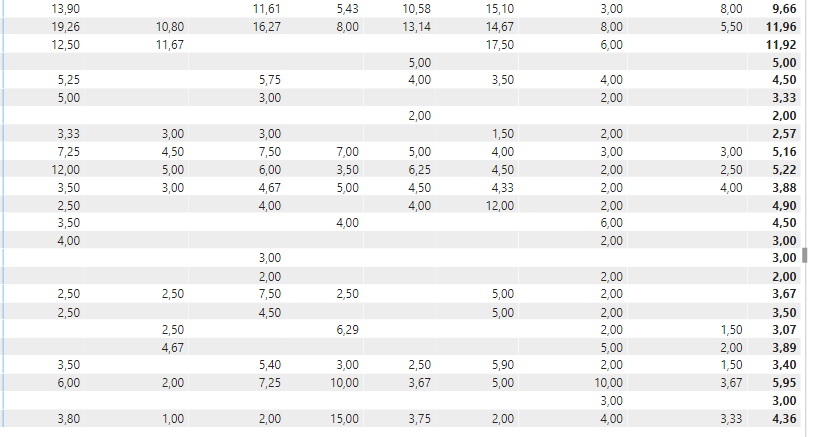
I have a matrix which looks like this:
The total column shows the average for the respective rows. I want to apply conditional formatting to the values based on the value in the Total Column. If the value is lower than the value in the total column it shoult be displayed in green and if it is higher it should be red. How can I achieve this?
Thank you!
Solved! Go to Solution.
Hi @Anonymous ,
You need to create a measure for the condittional formatting something similar to:
Coditional formatting = IF([Average]>= CALCULATE([Average];ALLSELECTED('Table'[Columns Category]));"#517d4f";"#b81818")
[Average] - Measure used for filling out the values in the matrix
If there is none create the following:
Average = Average(Table[Values])
Table[Columns Category] - the name of the column used on your columns in the matrix
Then use the condittional formatting Field Value and chosse the previous measure.
You can adjust the values in "" to the colours you want.
Regards
Miguel Félix
Proud to be a Super User!
Check out my blog: Power BI em PortuguêsHi @Anonymous ,
You need to create a measure for the condittional formatting something similar to:
Coditional formatting = IF([Average]>= CALCULATE([Average];ALLSELECTED('Table'[Columns Category]));"#517d4f";"#b81818")
[Average] - Measure used for filling out the values in the matrix
If there is none create the following:
Average = Average(Table[Values])
Table[Columns Category] - the name of the column used on your columns in the matrix
Then use the condittional formatting Field Value and chosse the previous measure.
You can adjust the values in "" to the colours you want.
Regards
Miguel Félix
Proud to be a Super User!
Check out my blog: Power BI em PortuguêsHi, I need some help, I'm failing at accomplishing this simple thing in Power BI.
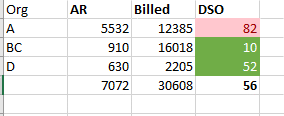
I have a matrix with a few columns, one of them is a measure called DSO.
I would like to color DSO based on its total. If >=total,"Red"; if < Total, "green"
Thank you
you have to create a new measure, which you can use for formatting. This measure should calculate the total value, on each field on your matrix. You can achive that by the ALL function. Your screenshot does not show the measure on which the columns are based.
let's assume that column is mydimesion[mytype], your used measure is [mymeasure]
your formatting measure should be
myformatting measure=
calculate([mymeasure],ALL(mydimension[mytype]))
The Power BI Data Visualization World Championships is back! Get ahead of the game and start preparing now!
Check out the November 2025 Power BI update to learn about new features.
| User | Count |
|---|---|
| 69 | |
| 47 | |
| 44 | |
| 28 | |
| 19 |
| User | Count |
|---|---|
| 200 | |
| 125 | |
| 102 | |
| 69 | |
| 53 |