cancel
Showing results for 
Search instead for 
Did you mean: 

Did you hear? There's a new SQL AI Developer certification (DP-800). Start preparing now and be one of the first to get certified. Register now

Reply
atul9063
Helper III
Helper III

Conditional formatting based on dropdown change

Hi,

In below requirement,

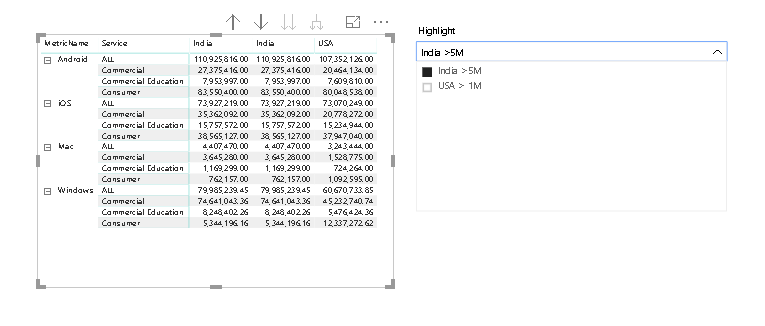
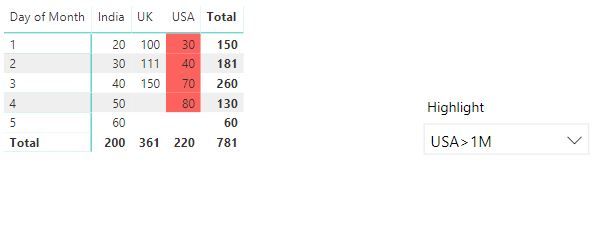
If select India>5M then India column value should highlight red 

If select USA>1M then USA column value should highlight red

image.png                                                                          Is this possible to select conditional filter in dropdown and display conditional formatting based on that?           

1 ACCEPTED SOLUTION

@v-lili6-msftI have solved this problem.


1) I have created dimsion table Country, with India>5M and USA>1M as values


2) I have created two measures

measure1=VAR HAPP1 = VALUES(Table1[India]) RETURN IF ( ABS(HAPP1 ) > 5000000 ,1)

 measure2=VAR HAPP2 = VALUES(Table1[Americ]) RETURN IF ( ABS(HAPP2 ) > 1000000 ,2)


3) Then i have created third measures which will call above two measures

measures3=

VAR selection  =
[CheckSelected]
RETURN
SWITCH (
TRUE (),
MySelection = "India>5M",[measure1] ,
MySelection = "USA > 1M", [measure2],
BLANK())


4) Go to conditional formatting,select measure3 in rules and select value 1 and 2 for red .

View solution in original post

3 REPLIES 3
v-lili6-msft
Community Support
Community Support

hi, @atul9063

After my test, you could this way as below:

Step1:

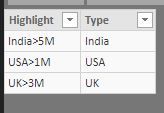
Create a highlight table map to region field (USA, India, etc.) of basic table

For example

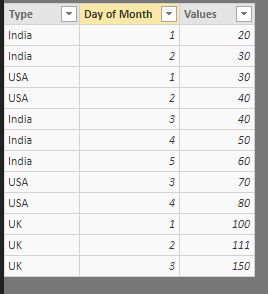
basic tablebasic tablemapping tablemapping table

Note: Do not create a relationship between them


Step2:

Create a measure like this

Measure = IF(SELECTEDVALUE('Table 2'[Type])=SELECTEDVALUE('Table'[Type]),1)

Step3:

Set Conditional formatting like below:

9.JPG

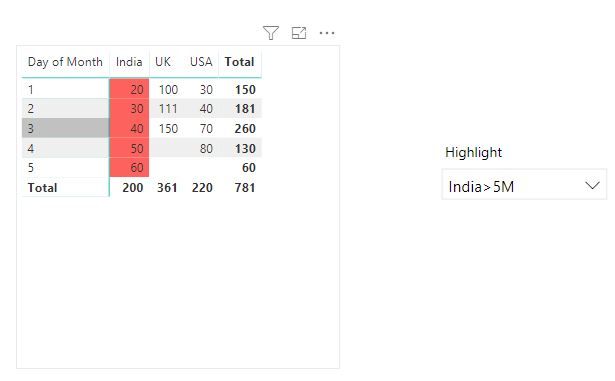
Result:

10.JPG11.JPG

Best Regards,

Lin


Community Support Team _ Lin
If this post helps, then please consider Accept it as the solution to help the other members find it more quickly.

@v-lili6-msftI have solved this problem.


1) I have created dimsion table Country, with India>5M and USA>1M as values


2) I have created two measures

measure1=VAR HAPP1 = VALUES(Table1[India]) RETURN IF ( ABS(HAPP1 ) > 5000000 ,1)

 measure2=VAR HAPP2 = VALUES(Table1[Americ]) RETURN IF ( ABS(HAPP2 ) > 1000000 ,2)


3) Then i have created third measures which will call above two measures

measures3=

VAR selection  =
[CheckSelected]
RETURN
SWITCH (
TRUE (),
MySelection = "India>5M",[measure1] ,
MySelection = "USA > 1M", [measure2],
BLANK())


4) Go to conditional formatting,select measure3 in rules and select value 1 and 2 for red .

hi, @atul9063

Could you please tell me if your problem has been solved? If it is, could you please mark the helpful replies as Answered?


Best Regards,

Lin

Community Support Team _ Lin
If this post helps, then please consider Accept it as the solution to help the other members find it more quickly.

Helpful resources

Announcements
April Power BI Update Carousel

Power BI Monthly Update - April 2026

Check out the April 2026 Power BI update to learn about new features.

Fabric SQL PBI Data Days

Data Days 2026 coming soon!

Sign up to receive a private message when registration opens and key events begin.

New to Fabric survey Carousel

New to Fabric Survey

If you have recently started exploring Fabric, we'd love to hear how it's going. Your feedback can help with product improvements.

Power BI DataViz World Championships carousel

Power BI DataViz World Championships - June 2026

A new Power BI DataViz World Championship is coming this June! Don't miss out on submitting your entry.