cancel
Showing results for 
Search instead for 
Did you mean: 

Join the FabCon + SQLCon recap series. Up next: Power BI, Real-Time Intelligence, IQ and AI, and Data Factory take center stage. All sessions are available on-demand after the live show. Register now

Reply
sarah2_williams
Helper III
Helper III

Conditional formatting a KPI based on value

Hi all,


I am trying to format the backgroud of a KPI visual based on the value in the data label. It is showing a year on year difference, the difference is pre-calculated in the data and has it's own column.


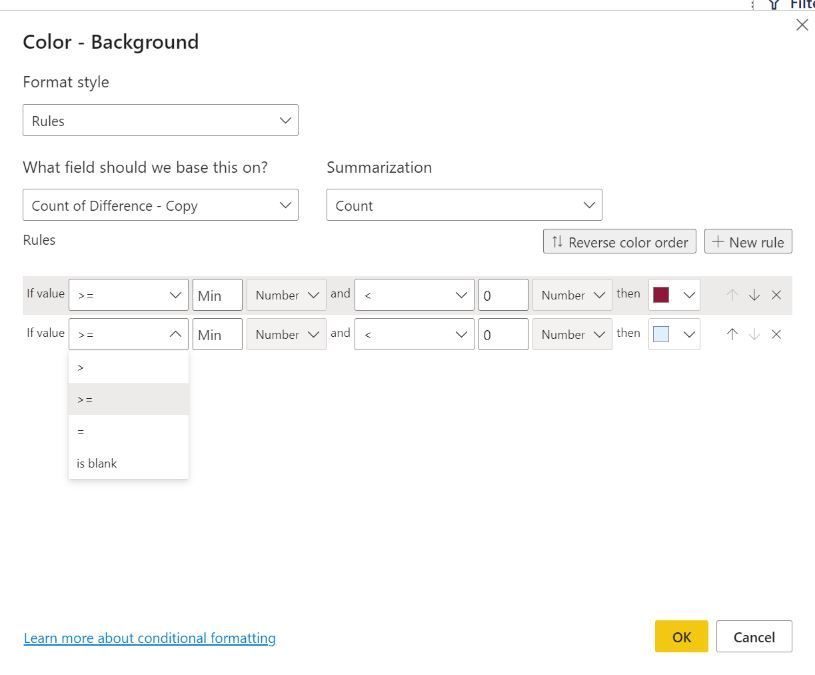
I am trying to format the background colour so if it is minus = red, 0 = Yello, Positive = Green, however I can't seem to find a way to do this when going into the fx and then Rules, it allows me to make it red if it's greater than the minimum value and below 0 - great, but when I add a new rule i'm not able to then say if it's above 0 make it green.. This seems like a basic thing that alot of people might need - so really hoping that it's somewhere.


The image below is where the field is formatted as text, when it is formatted as number I get the same options, I can't amend the box that says 'Min' or the dropdown next to it?


Thanks

S

SPBI Formatting.JPG

1 ACCEPTED SOLUTION
v-easonf-msft
Community Support
Community Support

Hi, @sarah2_williams 

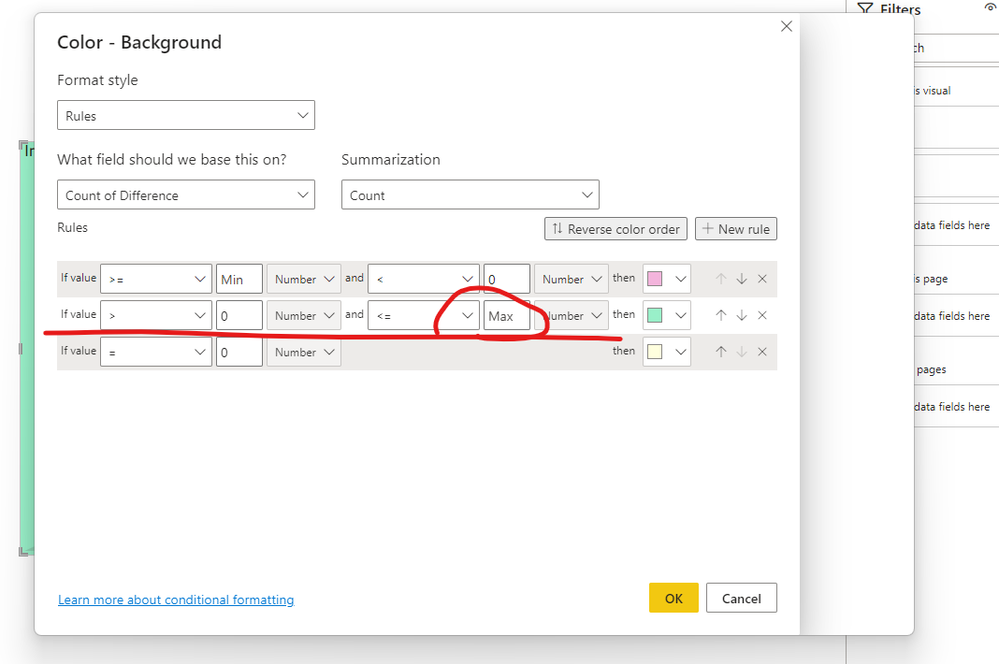
You need to make sure that there are no conflicting conditions in each rule otherwise it will lead to wrong results.

Please modified your second rule (turn green when count value is above 0) as below :

6.png


In addition, please reconfirm the summarization of your rule field. If the summarization type is 'Count', then there is no need to define rules for negative numbers.

Please check my sample files for more detail.


Best Regards,
Community Support Team _ Eason


View solution in original post

1 REPLY 1
v-easonf-msft
Community Support
Community Support

Hi, @sarah2_williams 

You need to make sure that there are no conflicting conditions in each rule otherwise it will lead to wrong results.

Please modified your second rule (turn green when count value is above 0) as below :

6.png


In addition, please reconfirm the summarization of your rule field. If the summarization type is 'Count', then there is no need to define rules for negative numbers.

Please check my sample files for more detail.


Best Regards,
Community Support Team _ Eason


Helpful resources

Announcements
April Power BI Update Carousel

Power BI Monthly Update - April 2026

Check out the April 2026 Power BI update to learn about new features.

New to Fabric survey Carousel

New to Fabric Survey

If you have recently started exploring Fabric, we'd love to hear how it's going. Your feedback can help with product improvements.

Power BI DataViz World Championships carousel

Power BI DataViz World Championships - June 2026

A new Power BI DataViz World Championship is coming this June! Don't miss out on submitting your entry.

FabCon and SQLCon Highlights Carousel

FabCon & SQLCon Highlights

Experience the highlights from FabCon & SQLCon, available live and on-demand starting April 14th.

Users online (5,235)