Join us at FabCon Atlanta from March 16 - 20, 2026, for the ultimate Fabric, Power BI, AI and SQL community-led event. Save $200 with code FABCOMM.
Register now!Vote for your favorite vizzies from the Power BI Dataviz World Championship submissions. Vote now!
I have 2 tables, EVP and VP, both connected by EVP program ID.
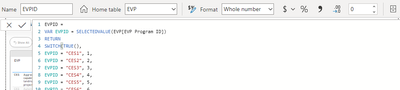
And I have 1 measure DAX that converts EVP program ID into a number like this.
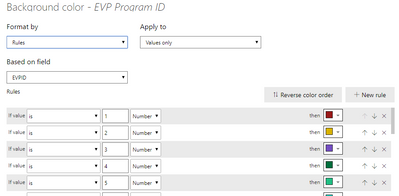
Then, I used the number from the measurement to create conditional formatting (to color the background and font)
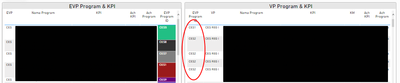
But, why the color is not shown when table VP display all data?
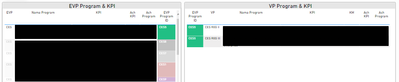
Strangely, the conditional formatting works well if I select a data in EVP table? I have applied same method on 2 other tables and it works fine. Please help
Show all data
Select a data
Hi @neonanora ,
Can you kindly share some sample data and the expected result to help me in order to have a clear understanding of your question? I can do some tests to help you figure out this issue.
You can save your files in OneDrive, Google Drive, or any other cloud sharing platforms and share the link here.
Best Regards,
Yuna
Vote for your favorite vizzies from the Power BI World Championship submissions!
If you love stickers, then you will definitely want to check out our Community Sticker Challenge!
Check out the January 2026 Power BI update to learn about new features.
| User | Count |
|---|---|
| 57 | |
| 52 | |
| 40 | |
| 17 | |
| 16 |
| User | Count |
|---|---|
| 112 | |
| 108 | |
| 39 | |
| 34 | |
| 27 |