Don't miss your chance to take the Fabric Data Engineer (DP-600) exam for FREE! Find out how by watching the DP-600 session on-demand now through April 28th.
Learn moreJoin the FabCon + SQLCon recap series. Up next: Power BI, Real-Time Intelligence, IQ and AI, and Data Factory take center stage. All sessions are available on-demand after the live show. Register now
Hi all
I'm trying to conditional format subtotal row but without success. I need to format conditionally in base of the percent presented in each of the time range in the row of the weeks. I don't see how to create diferent rules at the 4 different option of time range.
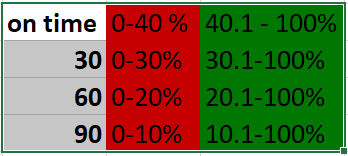
At the following table I show you how I want to view the color of the values.
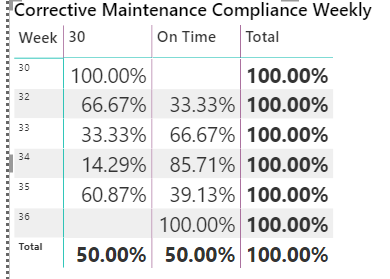
The visual at power bi is the following matrix:
Hi @mariannacarbo ,
I am a little confused about your description. Do you want to use Conditional format to determine the different colors of the Subtotal in the screenshot below according to the conditions?
If I understand the error, please point out and provide relevant test data (delete sensitive information) or expected results. Looking forward to your reply.
Best Regards,
Henry
If this post helps, then please consider Accept it as the solution to help the other members find it more quickly.
Hi,
when you go to CONDIOTIONAL FORMATTING window, on top try applying your rule to TOTALS ONLY, then create a measure to do the subtotals separately and base your formatting based on that field.
If this is not the answer you're seeking, please share more info.
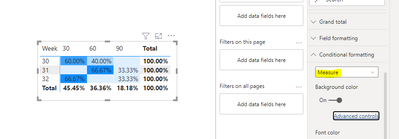
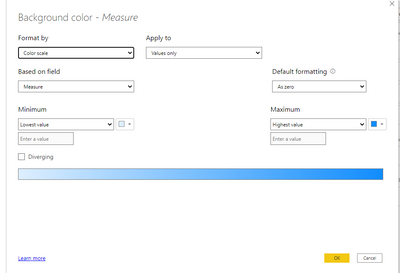
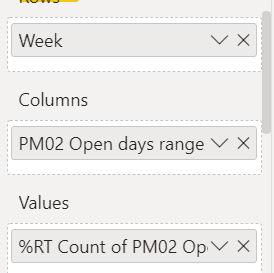
Thanks for your help @sshokri89., but I can't create a specific rule for each one of the different options of range time. I'm showing how I performed this visual:
Any advice?
Check out the April 2026 Power BI update to learn about new features.
If you have recently started exploring Fabric, we'd love to hear how it's going. Your feedback can help with product improvements.
A new Power BI DataViz World Championship is coming this June! Don't miss out on submitting your entry.
| User | Count |
|---|---|
| 43 | |
| 37 | |
| 34 | |
| 21 | |
| 16 |
| User | Count |
|---|---|
| 65 | |
| 64 | |
| 31 | |
| 26 | |
| 25 |