I have followed Sam's tutorial
https://blog.enterprisedna.co/how-to-calculate-a-cumulative-run-rate-in-power-bi-using-dax/
I have compiled the measures, my problem is I want the forecast measure to be conditional on the target (specifically if the target (grey column) is 0 for the day, do not add the run rate (blue) to the forecast (orange), similar to distinctcount).
Another issue is that it does not start at day 1, see yellow highlighted cell. I have c&ped my measures down the bottom for your ref. any help appreciated.
The picture is a data export of my current measures from power bi.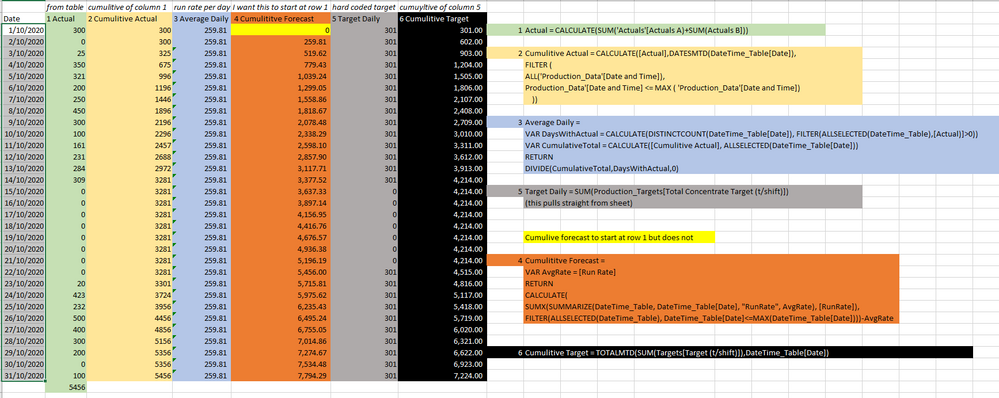
Actual = CALCULATE(SUM('Actuals'[Actuals A)+SUM(Actuals B]))
Cumulitive Actual = CALCULATE([Actual],DATESMTD(DateTime_Table[Date]),
FILTER (
ALL('Production_Data'[Date and Time]),
'Production_Data'[Date and Time] <= MAX ( 'Production_Data'[Date and Time])
))
Average Daily =
VAR DaysWithActual = CALCULATE(DISTINCTCOUNT(DateTime_Table[Date]), FILTER(ALLSELECTED(DateTime_Table),[Actual)]>0))
VAR CumulativeTotal = CALCULATE([Cumulitive Actual], ALLSELECTED(DateTime_Table[Date]))
RETURN
DIVIDE(CumulativeTotal,DaysWithActual,0)
Target Daily = SUM(Production_Targets[Total Concentrate Target (t/shift)])
Cumulititve Forecast =
VAR AvgRate = [Run Rate]
RETURN
CALCULATE(
SUMX(SUMMARIZE(DateTime_Table, DateTime_Table[Date], "RunRate", AvgRate), [RunRate]),
FILTER(ALLSELECTED(DateTime_Table), DateTime_Table[Date]<=MAX(DateTime_Table[Date])))-AvgRate


