This time we’re going bigger than ever. Fabric, Power BI, SQL, AI and more. We're covering it all. You won't want to miss it.
Learn moreLevel up your Power BI skills this month - build one visual each week and tell better stories with data! Get started
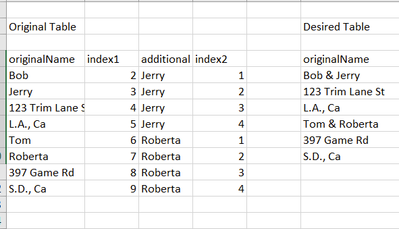
I having been trying to do the below using some code in a "custom column" but it does not seem to work. In the original table, there are two names for each address and these should be combined into a single line as shown in the Desired Table. When I try to use custom table, I run into trouble here
if the additional column = 2
then --- I have tried various ways, none work ---- this is where the problem is
else ' '
Solved! Go to Solution.
@se2 Try:
let
Source = Table.FromRows(Json.Document(Binary.Decompress(Binary.FromText("i45WcspPUtJR8kotKqpUitWJhrKQRQyNjBVCijJzFXwS81JRZHz0HPV0FJwdUQRD8nOB/KD8pNSikkSwCIyNKmpsaa7gnpibqhCUgiYTrOcCMxYuHAsA", BinaryEncoding.Base64), Compression.Deflate)), let _t = ((type nullable text) meta [Serialized.Text = true]) in type table [name1 = _t, name2 = _t]),
#"Changed Type" = Table.TransformColumnTypes(Source,{{"name1", type text}, {"name2", type text}}),
#"Added Index" = Table.AddIndexColumn(#"Changed Type", "Index", 2, 1, Int64.Type),
#"Grouped Rows" = Table.Group(#"Added Index", {"name2"}, {{"Table", each _, type table [name1=nullable text, name2=nullable text, Index=number]}}),
#"Added Custom" = Table.AddColumn(#"Grouped Rows", "Custom", each Table.AddIndexColumn([Table],"Index2",1)),
#"Expanded Custom" = Table.ExpandTableColumn(#"Added Custom", "Custom", {"name1", "Index2"}, {"Custom.name1", "Custom.Index2"}),
#"Removed Columns" = Table.RemoveColumns(#"Expanded Custom",{"Table"}),
#"Reordered Columns" = Table.ReorderColumns(#"Removed Columns",{"Custom.name1", "name2", "Custom.Index2"}),
#"Filtered Rows" = Table.SelectRows(#"Reordered Columns", each ([Custom.Index2] <> 2)),
#"Added Custom1" = Table.AddColumn(#"Filtered Rows", "Custom", each if [Custom.Index2] = 1 then [Custom.name1] & "&" & [name2] else [Custom.name1]),
#"Removed Columns1" = Table.RemoveColumns(#"Added Custom1",{"Custom.name1", "name2", "Custom.Index2"})
in
#"Removed Columns1"
let
Source = Table.FromRows(Json.Document(Binary.Decompress(Binary.FromText("i45WcspPUorViVbySi0qqgSzDI2MFUKKMnMVfBLzUsEiPnqOejoKzo5gTkh+LpgOyk9KLSpJBLONLc0V3BNzUxWCUsD8YD0XqIZYAA==", BinaryEncoding.Base64), Compression.Deflate)), let _t = ((type nullable text) meta [Serialized.Text = true]) in type table [originalName = _t]),
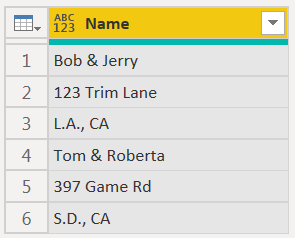
#"Combined Names" = List.Transform(List.Split(Source[originalName], 4), each {_{0} & " & " & _{1}} & List.Skip(_, 2)),
Names = Table.FromList(List.Combine( #"Combined Names" ), Splitter.SplitByNothing(), {"Name"})
in
Names
| Thanks to the great efforts by MS engineers to simplify syntax of DAX! Most beginners are SUCCESSFULLY MISLED to think that they could easily master DAX; but it turns out that the intricacy of the most frequently used RANKX() is still way beyond their comprehension! |
DAX is simple, but NOT EASY! |
let
Source = Table.FromRows(Json.Document(Binary.Decompress(Binary.FromText("i45WcspPUorViVbySi0qqgSzDI2MFUKKMnMVfBLzUsEiPnqOejoKzo5gTkh+LpgOyk9KLSpJBLONLc0V3BNzUxWCUsD8YD0XqIZYAA==", BinaryEncoding.Base64), Compression.Deflate)), let _t = ((type nullable text) meta [Serialized.Text = true]) in type table [originalName = _t]),
#"Combined Names" = List.Transform(List.Split(Source[originalName], 4), each {_{0} & " & " & _{1}} & List.Skip(_, 2)),
Names = Table.FromList(List.Combine( #"Combined Names" ), Splitter.SplitByNothing(), {"Name"})
in
Names
| Thanks to the great efforts by MS engineers to simplify syntax of DAX! Most beginners are SUCCESSFULLY MISLED to think that they could easily master DAX; but it turns out that the intricacy of the most frequently used RANKX() is still way beyond their comprehension! |
DAX is simple, but NOT EASY! |
@se2 Try:
let
Source = Table.FromRows(Json.Document(Binary.Decompress(Binary.FromText("i45WcspPUtJR8kotKqpUitWJhrKQRQyNjBVCijJzFXwS81JRZHz0HPV0FJwdUQRD8nOB/KD8pNSikkSwCIyNKmpsaa7gnpibqhCUgiYTrOcCMxYuHAsA", BinaryEncoding.Base64), Compression.Deflate)), let _t = ((type nullable text) meta [Serialized.Text = true]) in type table [name1 = _t, name2 = _t]),
#"Changed Type" = Table.TransformColumnTypes(Source,{{"name1", type text}, {"name2", type text}}),
#"Added Index" = Table.AddIndexColumn(#"Changed Type", "Index", 2, 1, Int64.Type),
#"Grouped Rows" = Table.Group(#"Added Index", {"name2"}, {{"Table", each _, type table [name1=nullable text, name2=nullable text, Index=number]}}),
#"Added Custom" = Table.AddColumn(#"Grouped Rows", "Custom", each Table.AddIndexColumn([Table],"Index2",1)),
#"Expanded Custom" = Table.ExpandTableColumn(#"Added Custom", "Custom", {"name1", "Index2"}, {"Custom.name1", "Custom.Index2"}),
#"Removed Columns" = Table.RemoveColumns(#"Expanded Custom",{"Table"}),
#"Reordered Columns" = Table.ReorderColumns(#"Removed Columns",{"Custom.name1", "name2", "Custom.Index2"}),
#"Filtered Rows" = Table.SelectRows(#"Reordered Columns", each ([Custom.Index2] <> 2)),
#"Added Custom1" = Table.AddColumn(#"Filtered Rows", "Custom", each if [Custom.Index2] = 1 then [Custom.name1] & "&" & [name2] else [Custom.name1]),
#"Removed Columns1" = Table.RemoveColumns(#"Added Custom1",{"Custom.name1", "name2", "Custom.Index2"})
in
#"Removed Columns1"
Check out the April 2026 Power BI update to learn about new features.
Sign up to receive a private message when registration opens and key events begin.
If you have recently started exploring Fabric, we'd love to hear how it's going. Your feedback can help with product improvements.
| User | Count |
|---|---|
| 37 | |
| 29 | |
| 29 | |
| 21 | |
| 18 |
| User | Count |
|---|---|
| 68 | |
| 39 | |
| 33 | |
| 24 | |
| 23 |