cancel
Showing results for 
Search instead for 
Did you mean: 

The Power BI Data Visualization World Championships is back! Get ahead of the game and start preparing now! Learn more

Reply
pstanek
Post Patron
Post Patron

Conditional column

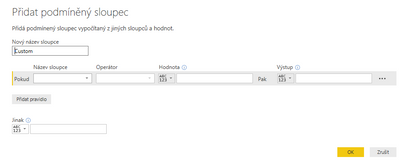
I create conditinal column and I will click OK . Can I reopen this window?  If want to modify conditional column by  it ,not by rewriting formula.Výstřižek.PNG


1 ACCEPTED SOLUTION
Sean
Community Champion
Community Champion

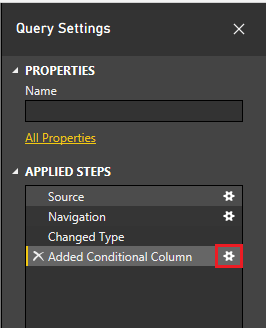
In the the Query Editor - on the Right side in the Query Settings under Applied Steps

click to the right of the Added Additional Column step

Edit Conditional Column.png

This will open that window again and let you change the conditions!

Good Luck! Smiley Happy


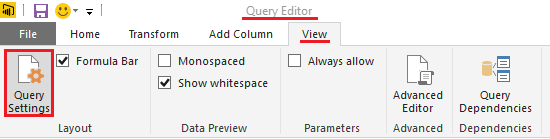
EDIT: If you don't see the Query Settings on the right side

Again in the Query Editor - go to the View Tab - click Query Settings - to open it again

Edit Conditional Column2.png

View solution in original post

3 REPLIES 3
Sean
Community Champion
Community Champion

In the the Query Editor - on the Right side in the Query Settings under Applied Steps

click to the right of the Added Additional Column step

Edit Conditional Column.png

This will open that window again and let you change the conditions!

Good Luck! Smiley Happy


EDIT: If you don't see the Query Settings on the right side

Again in the Query Editor - go to the View Tab - click Query Settings - to open it again

Edit Conditional Column2.png

Anonymous
Not applicable

Hi Sean, 


I'd like to create many Conditional columns with same settings but different column source. Is there a way to be able to duplicate and modify the setting of the duplicated column?


Thanks, 

Sara

thanks

Helpful resources

Announcements
Power BI DataViz World Championships

Power BI Dataviz World Championships

The Power BI Data Visualization World Championships is back! Get ahead of the game and start preparing now!

December 2025 Power BI Update Carousel

Power BI Monthly Update - December 2025

Check out the December 2025 Power BI Holiday Recap!

FabCon Atlanta 2026 carousel

FabCon Atlanta 2026

Join us at FabCon Atlanta, March 16-20, for the ultimate Fabric, Power BI, AI and SQL community-led event. Save $200 with code FABCOMM.