Join us at FabCon Atlanta from March 16 - 20, 2026, for the ultimate Fabric, Power BI, AI and SQL community-led event. Save $200 with code FABCOMM.
Register now!The Power BI Data Visualization World Championships is back! It's time to submit your entry. Live now!
Hi all,
I have some data that consists of a wholesaler and sales reps attached to each wholesaler. Different wholesalers have a different number of sales rep attached to them. Each sales rep has a daily target of 35 visits. I need to show these daily targets against the wholesaler.
What DAX formula could I use to achieve this? Thank you.
| Wholesaler | Sales reps attached | Target per Sales rep | Targets |
| A | 2 | 35 | 70 |
| B | 3 | 35 | 105 |
| C | 4 | 35 | 140 |
| D | 5 | 35 | 175 |
| E | 4 | 35 | 140 |
Solved! Go to Solution.
@Kaskazi_Network , Is that product of two columns ??
New column
rep Targets= [Sales reps attached]* [Target per Sales]
@Kaskazi_Network , Is that product of two columns ??
New column
rep Targets= [Sales reps attached]* [Target per Sales]
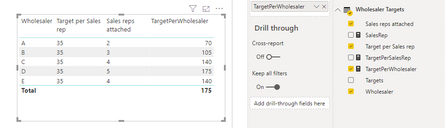
hi @Kaskazi_Network - Please look at the below steps to achieve the same using DAX
You need to create the below 3 measures to achieve the desired result.
Please mark the post as a solution and provide a 👍 if my comment helped with solving your issue. Thanks!
Proud to be a Super User!
The last column shows Wholesaler Targets
The Power BI Data Visualization World Championships is back! It's time to submit your entry.
Check out the January 2026 Power BI update to learn about new features.
| User | Count |
|---|---|
| 63 | |
| 43 | |
| 31 | |
| 27 | |
| 23 |
| User | Count |
|---|---|
| 134 | |
| 113 | |
| 58 | |
| 39 | |
| 35 |