Don't miss your chance to take the Fabric Data Engineer (DP-600) exam for FREE! Find out how by watching the DP-600 session on-demand now through April 28th.
Learn moreJoin the FabCon + SQLCon recap series. Up next: Power BI, Real-Time Intelligence, IQ and AI, and Data Factory take center stage. All sessions are available on-demand after the live show. Register now
Hello,
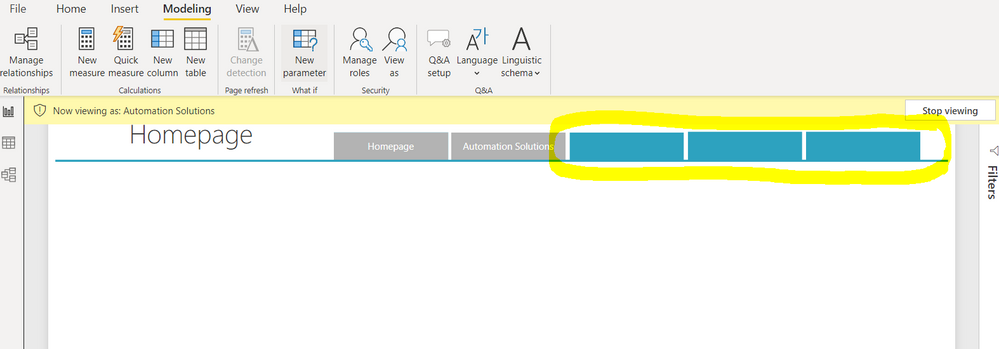
I just need help, I don't know why button color doesn't change when certain page is selected and when changing the roles for RLS button not changing to white those button not viewable for specific role.
I have attached herewith the pbi file.
https://drive.google.com/file/d/1baDMJWcN8XwzD61Rx_WbkPjHqoMzAQbk/view?usp=sharing
Solved! Go to Solution.
Hi @jovendeluna21 ,
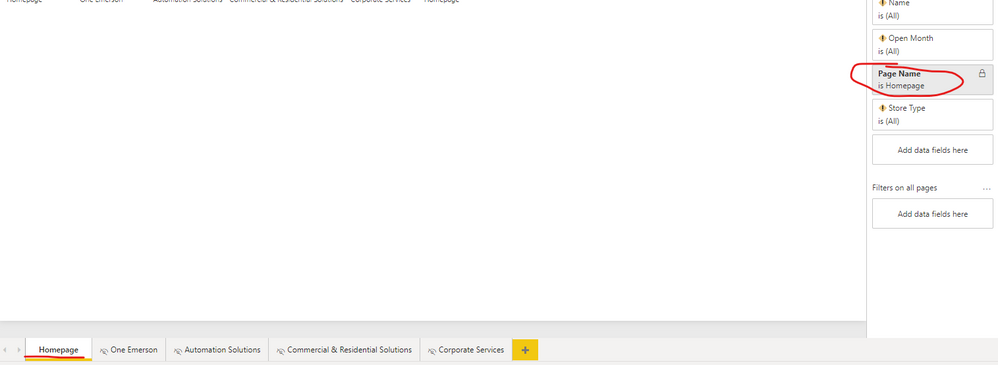
You need to add the correct page-level filter for each page using the Page Current Selector[Page Name] field, like this:
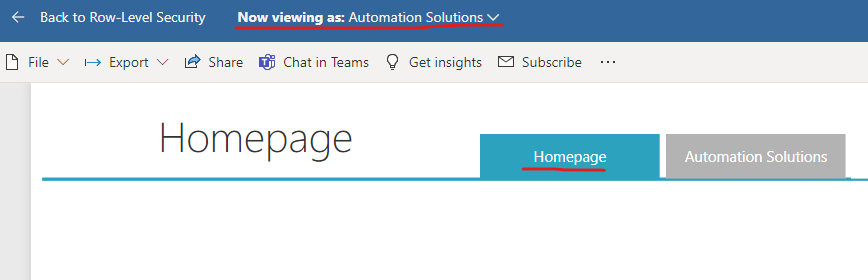
The result:
If the problem is still not resolved, please provide detailed error information or the expected result you expect. Let me know immediately, looking forward to your reply.
Best Regards,
Winniz
If this post helps, then please consider Accept it as the solution to help the other members find it more quickly.
Hi @jovendeluna21 ,
Because SELECTEDVALUE('Page Current Selector'[Page Name]) returns blank, so [Button 3 Destination] = SELECTEDVALUE('Page Current Selector'[Page Name]) = Blank(), the [Button 3 Color] measure returns "#2DA2BF".
Please try the following measures:
Button 1 Color = SWITCH([Button 1 Destination],
BLANK(),"Whiter",
SELECTEDVALUE('Page Current Selector'[Page Name]), "#2DA2BF",
"#B3B3B3")Button 2 Color = SWITCH([Button 2 Destination],
BLANK(),"Whiter",
SELECTEDVALUE('Page Current Selector'[Page Name]), "#2DA2BF",
"#B3B3B3")Button 3 Color = SWITCH([Button 3 Destination],
BLANK(),"Whiter",
SELECTEDVALUE('Page Current Selector'[Page Name]), "#2DA2BF",
"#B3B3B3")Button 4 Color = SWITCH([Button 4 Destination],
BLANK(),"Whiter",
SELECTEDVALUE('Page Current Selector'[Page Name]), "#2DA2BF",
"#B3B3B3")Button 5 Color = SWITCH([Button 5 Destination],
BLANK(),"Whiter",
SELECTEDVALUE('Page Current Selector'[Page Name]), "#2DA2BF",
"#B3B3B3")

If the problem is still not resolved, please provide detailed error information or the expected result you expect. Let me know immediately, looking forward to your reply.
Best Regards,
Winniz
If this post helps, then please consider Accept it as the solution to help the other members find it more quickly.
Thank you very much @v-kkf-msft! However I want also the button of the current page selection to be in blue color. For example if you are viewing Automation Solutions, the button Automation Solutions will be blue and the homepage is gray, but if you switch to Homepage, the Homepage button will be blue and Automation Solutions will be in gray.
Hi @jovendeluna21 ,
You need to add the correct page-level filter for each page using the Page Current Selector[Page Name] field, like this:
The result:
If the problem is still not resolved, please provide detailed error information or the expected result you expect. Let me know immediately, looking forward to your reply.
Best Regards,
Winniz
If this post helps, then please consider Accept it as the solution to help the other members find it more quickly.
Check out the April 2026 Power BI update to learn about new features.
If you have recently started exploring Fabric, we'd love to hear how it's going. Your feedback can help with product improvements.
A new Power BI DataViz World Championship is coming this June! Don't miss out on submitting your entry.
| User | Count |
|---|---|
| 42 | |
| 38 | |
| 33 | |
| 21 | |
| 15 |
| User | Count |
|---|---|
| 64 | |
| 59 | |
| 31 | |
| 27 | |
| 25 |