cancel
Showing results for 
Search instead for 
Did you mean: 

We've captured the moments from FabCon & SQLCon that everyone is talking about, and we are bringing them to the community, live and on-demand. Starts on April 14th. Register now

Reply
danielpaduck
Helper III
Helper III

Conditional Measure Is Not Totaling Correctly

Hi,


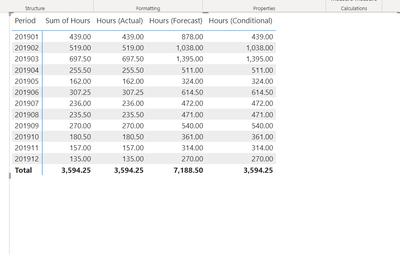
I have the following report for test:


danielpaduck_0-1703519992406.png


I have regular hours, then forecasted hours (regular x 2) and then a conditional measure that states the following:  


Hours (Conditional) = IF([Period (msr)] >= 201901 && [Period (msr)] <= 201901, 'LD Actual'[Hours (Actual)], 'LD Forecast'[Hours (Forecast)])
 
Why is the total for this column not correct?  Each period itself is ok but the total is not. 
 
Thanks!


1 ACCEPTED SOLUTION
bestevezdyb
Frequent Visitor

you can try, assuming you have the values in different tables. But it is as @TomMartens  says, without the data model we cannot give an accurate answer.


SUMX(
    FILTER(
        TableHour,
        TableHour[date] >= 201901 && TableHour[date] <= 201901
    ),
    TableHour[hour]
)
+
SUMX(
    FILTER(
        TableHourF,
        TableHourF[date] > 201901
    ),
    TableHourF[hour]
)

View solution in original post

6 REPLIES 6
danielpaduck
Helper III
Helper III

How would it be possible to use variables insteaded of the hard coded values for the 201901?


SUMX(
    FILTER(
        TableHour,
        TableHour[date] >= 201901 && TableHour[date] <= 201901
    ),
    TableHour[hour]
)
+
SUMX(
    FILTER(
        TableHourF,
        TableHourF[date] > 201901
    ),
    TableHourF[hour]
)
 
Thanks!
danielpaduck
Helper III
Helper III

Hi,


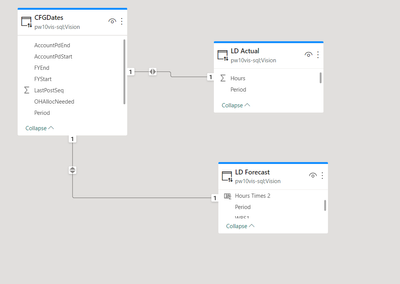
The following is my data model:  

danielpaduck_0-1703546316578.png


Essentially, what I am trying to accomplish is to show posted labor hours until a certain period and then after that period show the budget/forecasted hours.   There are three tables - CFGDates which contains the Period, LD Actual and LD Forecast.    It seems on the total, Power BI  does not have the Period filter anymore and then defaults to Actual hours.  

Have you tried the measure I have provided?

I will try today but the periods will need to be more dyamic instead of hard coding period ranges. Thanks!

bestevezdyb
Frequent Visitor

you can try, assuming you have the values in different tables. But it is as @TomMartens  says, without the data model we cannot give an accurate answer.


SUMX(
    FILTER(
        TableHour,
        TableHour[date] >= 201901 && TableHour[date] <= 201901
    ),
    TableHour[hour]
)
+
SUMX(
    FILTER(
        TableHourF,
        TableHourF[date] > 201901
    ),
    TableHourF[hour]
)
TomMartens
Super User
Super User

Hey @danielpaduck ,


it's tough to explain the behavior of the measure because you do not provide any information about the underlying data model and also do not provide the statement for the measure [Period (msr)], as this measure is controlling the condition.

Without explaining the business scenario the condition looks a little weird.

Then the Total, if the measure [Period (msr)]  is somehow dependent on the column used on rows, namely Period, then you have to be aware that this column does not contribute to the filter context for the total line.


Hopefully, this provides some ideas of how to check the result for the Total line.


Regards,

Tom


Did I answer your question? Mark my post as a solution, this will help others!

Proud to be a Super User!
I accept Kudos 😉
Hamburg, Germany

Helpful resources

Announcements
New to Fabric survey Carousel

New to Fabric Survey

If you have recently started exploring Fabric, we'd love to hear how it's going. Your feedback can help with product improvements.

Power BI DataViz World Championships carousel

Power BI DataViz World Championships - June 2026

A new Power BI DataViz World Championship is coming this June! Don't miss out on submitting your entry.

Join our Fabric User Panel

Join our Fabric User Panel

Share feedback directly with Fabric product managers, participate in targeted research studies and influence the Fabric roadmap.

March Power BI Update Carousel

Power BI Community Update - March 2026

Check out the March 2026 Power BI update to learn about new features.