Join us in Barcelona for FabCon and SQLCon, September 28 - October 1, 2026.
This is best Fabric, Power BI, SQL and AI community event. How do we know? The last event sold out! Save €200 with code FABCMTY200.
Register now- Power BI forums
- Get Help with Power BI
- Desktop
- Service
- Report Server
- Power Query
- Mobile Apps
- Developer
- DAX Commands and Tips
- Custom Visuals Development Discussion
- Health and Life Sciences
- Power BI Spanish forums
- Translated Spanish Desktop
- Training and Consulting
- Instructor Led Training
- Dashboard in a Day for Women, by Women
- Galleries
- Data Stories Gallery
- Themes Gallery
- Contests Gallery
- QuickViz Gallery
- Quick Measures Gallery
- Visual Calculations Gallery
- Notebook Gallery
- Translytical Task Flow Gallery
- TMDL Gallery
- R Script Showcase
- Webinars and Video Gallery
- Ideas
- Custom Visuals Ideas (read-only)
- Issues
- Issues
- Events
- Upcoming Events
A new Data Days event is coming soon! This time we’re going bigger than ever. Fabric, Power BI, SQL, AI and more. Don't miss out.
- Power BI forums
- Forums
- Get Help with Power BI
- Desktop
- Re: Conditional Measure Based on Date
- Subscribe to RSS Feed
- Mark Topic as New
- Mark Topic as Read
- Float this Topic for Current User
- Bookmark
- Subscribe
- Printer Friendly Page


- Mark as New
- Bookmark
- Subscribe
- Mute
- Subscribe to RSS Feed
- Permalink
- Report Inappropriate Content
Conditional Measure Based on Date
I have a set of data that has one record per OrderItemId which is a specific unit of a sale. I have two columns, CONDATE which is the begging date of this sale and FINALDATE which is when the sale closed in some way. I also have a separate date table.
What I want is to do is have a date field that a user enters and a measure returns how many OrderItemIDs were "active" for that specific date.
For example - if the date selected by the user was 1/3/2020, the result would be 2 since orders 1234001 & 1234002 had been ordered but not yet finalized. If the date was 1/5/2020 then the result would be 4. If the date was 1/8/2020 the result would be 3 since OrderItemID 1234003 had hit a FINALDATE of 1/6, so this order would be excluded.
| OrderItemID | CONDATE | FINALDATE |
1234001 | 1/1/2020 | 1/30/2020 |
| 1234002 | 1/1/2020 | 1/30/2020 |
| 1234003 | 1/4/2020 | 1/6/2020 |
| 1234004 | 1/4/2020 | 1/30/2020 |
| 1234005 | 1/9/2020 | 1/30/2020 |
| 1234006 | 1/9/2020 | 1/30/2020 |
Solved! Go to Solution.


- Mark as New
- Bookmark
- Subscribe
- Mute
- Subscribe to RSS Feed
- Permalink
- Report Inappropriate Content
Hi @awitt ,
We can try to use the following measure to meet your requirement:
Count =
CALCULATE (
    DISTINCTCOUNT ( 'Table'[OrderItemID] ),
    FILTER (
        'Table',
        OR (
            ISBLANK ( 'Table'[FINALDATE] ),
            NOT (
                OR (
                    'Table'[CONDATE] > MAX ( 'DateSlicer'[Date] ),
                    'Table'[FINALDATE] <= MIN ( 'DateSlicer'[Date] )
                )
            )
        )
    )
)
Best regards,
If this post helps, then please consider Accept it as the solution to help the other members find it more quickly.
- Mark as New
- Bookmark
- Subscribe
- Mute
- Subscribe to RSS Feed
- Permalink
- Report Inappropriate Content
Hi @awitt ,
We can create a calculated table and a measure to meet your requirement:
Calculated table:
DateSlicer = CALENDAR(DATE(2019,1,1),DATE(2021,12,31))
Measure:
Count =
CALCULATE (
    DISTINCTCOUNT ( 'Table'[OrderItemID] ),
    FILTER (
        'Table',
        NOT (
            OR (
                'Table'[CONDATE] > MAX ( 'DateSlicer'[Date] ),
                'Table'[FINALDATE] <= MIN ( 'DateSlicer'[Date] )
            )
        )
    )
)
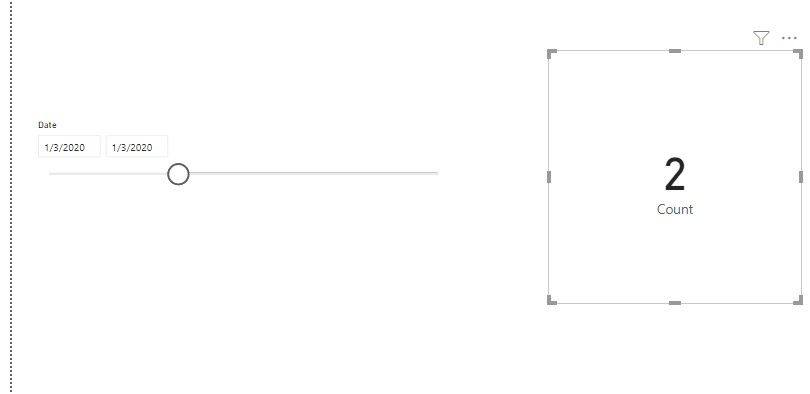
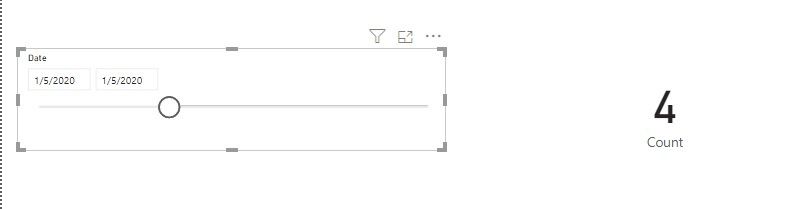
By the way, PBIX file as attached.
Best regards,
If this post helps, then please consider Accept it as the solution to help the other members find it more quickly.
- Mark as New
- Bookmark
- Subscribe
- Mute
- Subscribe to RSS Feed
- Permalink
- Report Inappropriate Content
@v-lid-msft I'm pretty sure this is going to work for my dataset. The hard thing is proving the results. Is there a way to have a table that only returns the results of a given day as well?
For instance, I have some days where the result for that day is over 20,000. I know i'm going to be asked which 20,000 records made up that number but I haven't been able to do that yet. Thoughts?
- Mark as New
- Bookmark
- Subscribe
- Mute
- Subscribe to RSS Feed
- Permalink
- Report Inappropriate Content
Hi @awitt ,
We can put the measure into visual filter of table chart, then set it "is not blank" or "is not zero" to meet your requirement:
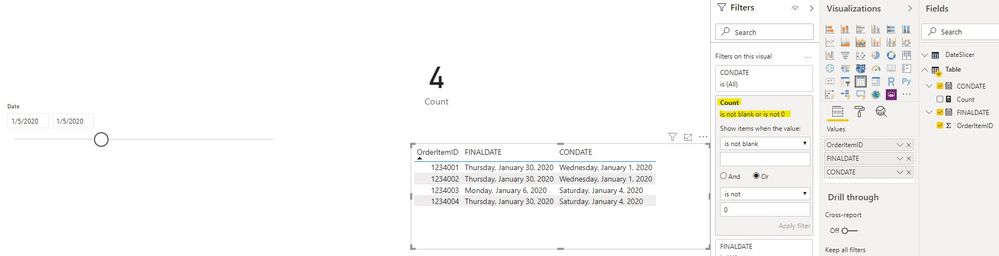
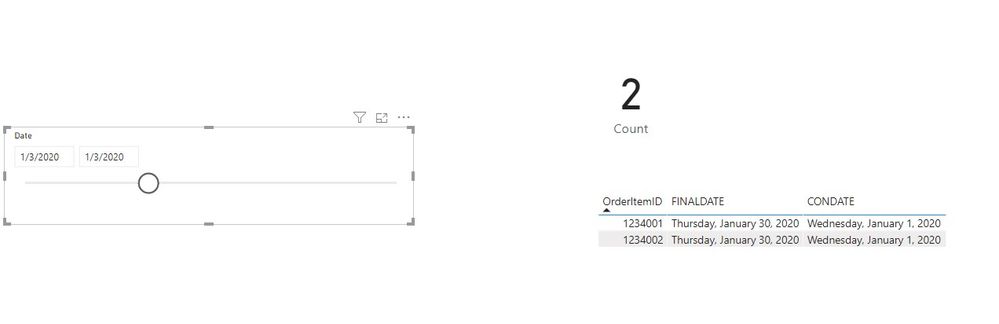
By the way, PBIX file as attached.
Best regards,
If this post helps, then please consider Accept it as the solution to help the other members find it more quickly.
- Mark as New
- Bookmark
- Subscribe
- Mute
- Subscribe to RSS Feed
- Permalink
- Report Inappropriate Content
@v-lid-msft The only thing that seems off is that Blank FINALDATE values are not included in the measure and they should be. If this is essentially open orders, there wont be Final Dates for active orders that haven't yet been completed.
- Mark as New
- Bookmark
- Subscribe
- Mute
- Subscribe to RSS Feed
- Permalink
- Report Inappropriate Content
Hi @awitt ,
How about the result after you follow the suggestions mentioned in my original post?Could you please provide more details about it If it doesn't meet your requirement?
Best regards,
If this post helps, then please consider Accept it as the solution to help the other members find it more quickly.
- Mark as New
- Bookmark
- Subscribe
- Mute
- Subscribe to RSS Feed
- Permalink
- Report Inappropriate Content
Hi @awitt ,
We can try to use the following measure to meet your requirement:
Count =
CALCULATE (
    DISTINCTCOUNT ( 'Table'[OrderItemID] ),
    FILTER (
        'Table',
        OR (
            ISBLANK ( 'Table'[FINALDATE] ),
            NOT (
                OR (
                    'Table'[CONDATE] > MAX ( 'DateSlicer'[Date] ),
                    'Table'[FINALDATE] <= MIN ( 'DateSlicer'[Date] )
                )
            )
        )
    )
)
Best regards,
If this post helps, then please consider Accept it as the solution to help the other members find it more quickly.


- Mark as New
- Bookmark
- Subscribe
- Mute
- Subscribe to RSS Feed
- Permalink
- Report Inappropriate Content
You will need something like Open Tickets: https://community.powerbi.com/t5/Quick-Measures-Gallery/Open-Tickets/td-p/409364
Follow on LinkedIn
@ me in replies or I'll lose your thread!!!
Instead of a Kudo, please vote for this idea
Become an expert!: Enterprise DNA
External Tools: MSHGQM
YouTube Channel!: Microsoft Hates Greg
Latest book!: DAX For Humans
DAX is easy, CALCULATE makes DAX hard...

Helpful resources

Power BI Monthly Update - May 2026
Check out the May 2026 Power BI update to learn about new features.

Data Days 2026 coming soon!
Sign up to receive a private message when registration opens and key events begin.

New to Fabric Survey
If you have recently started exploring Fabric, we'd love to hear how it's going. Your feedback can help with product improvements.

Power BI DataViz World Championships - June 2026
A new Power BI DataViz World Championship is coming this June! Don't miss out on submitting your entry.

| User | Count |
|---|---|
| 26 | |
| 25 | |
| 22 | |
| 19 | |
| 17 |


| User | Count |
|---|---|
| 42 | |
| 41 | |
| 40 | |
| 21 | |
| 20 |


