Join us in Barcelona for FabCon and SQLCon, September 28 - October 1, 2026.
This is best Fabric, Power BI, SQL and AI community event. How do we know? The last event sold out! Save €200 with code FABCMTY200.
Register now- Power BI forums
- Get Help with Power BI
- Desktop
- Service
- Report Server
- Power Query
- Mobile Apps
- Developer
- DAX Commands and Tips
- Custom Visuals Development Discussion
- Health and Life Sciences
- Power BI Spanish forums
- Translated Spanish Desktop
- Training and Consulting
- Instructor Led Training
- Dashboard in a Day for Women, by Women
- Galleries
- Data Stories Gallery
- Themes Gallery
- Contests Gallery
- QuickViz Gallery
- Quick Measures Gallery
- Visual Calculations Gallery
- Fabric Apps Gallery
- Notebook Gallery
- Translytical Task Flow Gallery
- TMDL Gallery
- R Script Showcase
- Webinars and Video Gallery
- Ideas
- Custom Visuals Ideas (read-only)
- Issues
- Issues
- Events
- Upcoming Events
July 28 - August 9 | Final Round of the Power BI Dataviz World Championships. This is your chance. Learn more
- Power BI forums
- Forums
- Get Help with Power BI
- Desktop
- Re: ppRe: Conditional Joining two Table
- Subscribe to RSS Feed
- Mark Topic as New
- Mark Topic as Read
- Float this Topic for Current User
- Bookmark
- Subscribe
- Printer Friendly Page

- Mark as New
- Bookmark
- Subscribe
- Mute
- Subscribe to RSS Feed
- Permalink
- Report Inappropriate Content
Conditional Joining two Table
Hi ALl,
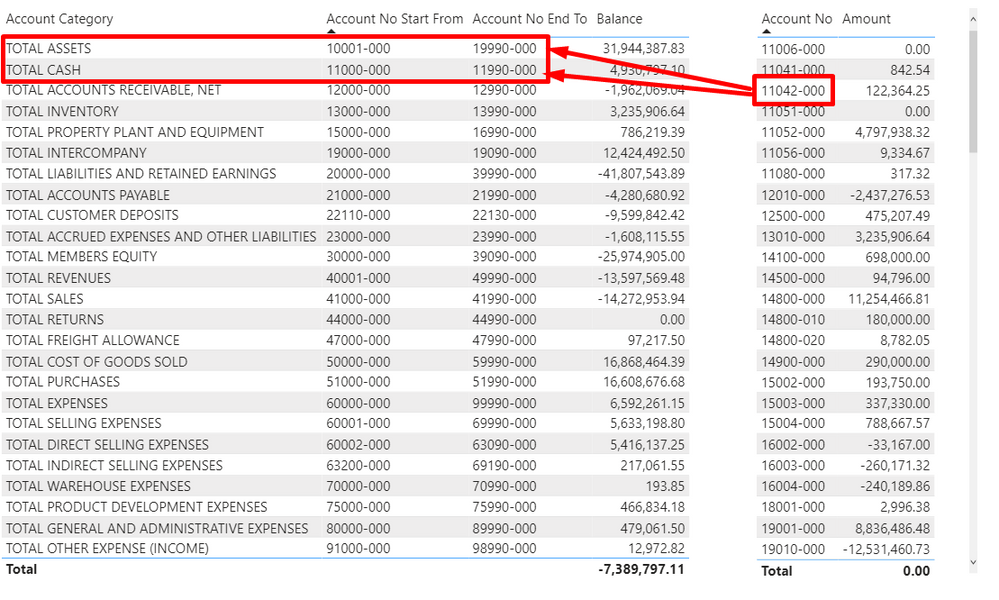
I have Two Table : Account No , Account Category
I want to connect these two table by Accoun Number
Ex: Account No : 11042-000 is want categorized Under Total Assets & Tatal Cash. Because Account No From 10001-000 to 19990-000 want to categorized Under Total Assets & From 11000-000 to 11990-000 want to categorized Under Total Cash.
11042-000 is satisfied these two Condition
Pbix File: https://www.dropbox.com/s/c8ca1a4d85vn6p6/Account%20Category.pbix?dl=0
Solved! Go to Solution.


- Mark as New
- Bookmark
- Subscribe
- Mute
- Subscribe to RSS Feed
- Permalink
- Report Inappropriate Content
Hello @vengadeshpalani,
The Measure I created provides the behavior you're seeing,
see screenshot below, link to the sample pbix file shows pbix
I hope this helps,
Richard
Did I answer your question? Mark my post as a solution! Kudos Appreciated!
Proud to be a Super User!


- Mark as New
- Bookmark
- Subscribe
- Mute
- Subscribe to RSS Feed
- Permalink
- Report Inappropriate Content
Hi @Anonymous ,
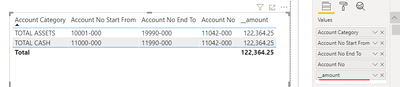
Don't create table relationships, just write a measure.
__amount =
CALCULATE(
    SUM('Account No'[Amount]),
    FILTER(
        'Account No',
        'Account No'[Account No] >= MAX('Account Category'[Account No Start From]) && 'Account No'[Account No] <= MAX('Account Category'[Account No End To])
    )
)
Best regards,
Lionel Chen
If this post helps, then please consider Accept it as the solution to help the other members find it more quickly.
- Mark as New
- Bookmark
- Subscribe
- Mute
- Subscribe to RSS Feed
- Permalink
- Report Inappropriate Content
Thanks For your Reply,
If i Click Total Assets, I want to filter out the Account No Related to Total Assets Category
I want to see the detail level also.
Can you Please Help me to resolve this logic
- Mark as New
- Bookmark
- Subscribe
- Mute
- Subscribe to RSS Feed
- Permalink
- Report Inappropriate Content
Hello @vengadeshpalani,
The Measure I created provides the behavior you're seeing,
see screenshot below, link to the sample pbix file shows pbix
I hope this helps,
Richard
Did I answer your question? Mark my post as a solution! Kudos Appreciated!
Proud to be a Super User!


- Mark as New
- Bookmark
- Subscribe
- Mute
- Subscribe to RSS Feed
- Permalink
- Report Inappropriate Content
@Anonymous
Seems you require to maintain and create a separate mapping table and create relationship to existing two tables.
- Mark as New
- Bookmark
- Subscribe
- Mute
- Subscribe to RSS Feed
- Permalink
- Report Inappropriate Content
Hi @Anonymous ,
I am going to attack this a little differently as this is a chart of accounts and the aggregation is not really additive, below you will find a measure that sums up the values of the transactions based on the range in the Account Category Table
Balance Measure =
if(
    HASONEVALUE('Account Category'[Account Category]),
    CALCULATE(sum('Account No'[Amount]), FILTER('Account No', 'Account No'[Account No] >= max('Account Category'[Account No Start From]) && 'Account No'[Account No] <= MAX('Account Category'[Account No End To])))
    ,Blank()
)

Hope this helps,
Richard
Did I answer your question? Mark my post as a solution!
Did my answers help arrive at a solution? Give it a kudos by clicking the Thumbs Up!
I hope this helps,
Richard
Did I answer your question? Mark my post as a solution! Kudos Appreciated!
Proud to be a Super User!


- Mark as New
- Bookmark
- Subscribe
- Mute
- Subscribe to RSS Feed
- Permalink
- Report Inappropriate Content
Hi!
I belive you need some sort of "bridge" table mate. 🙂
Just:
1. In Power Query build a table with 5 fields: [Account No], [Account No Start From], [Account No Start To], [Key] = [Account No Start From] + [Account No Start To], where + represents string concatenation between 2 columns (you can also use SQL if your tables come from a sql data source)
2. build a [key] column in your Account category table
3. Connect the bridge table buit in 1 to the Account Category table by the [Key] field
4. Connect the bridge table buit in 1 to the Account No table by the [Account no] field
5. Use the fields from your bridge table to make the reports
Hope this helps 🙂
Helpful resources

FabCon & SQLCon – Barcelona 2026
Join us in Barcelona for FabCon and SQLCon, the Fabric, Power BI, SQL, and AI community event. Save €200 with code FABCMTY200.

Power BI DataViz World Championships - June 2026
A new Power BI DataViz World Championship is coming this June! Don't miss out on submitting your entry.

| User | Count |
|---|---|
| 27 | |
| 22 | |
| 20 | |
| 18 | |
| 14 |


| User | Count |
|---|---|
| 25 | |
| 20 | |
| 20 | |
| 20 | |
| 20 |


