cancel
Showing results for 
Search instead for 
Did you mean: 

July 28 - August 9 | Final Round of the Power BI Dataviz World Championships. This is your chance. Learn more

Reply
Anonymous
Not applicable

Conditional Index Column Based on Date

Good day to you all


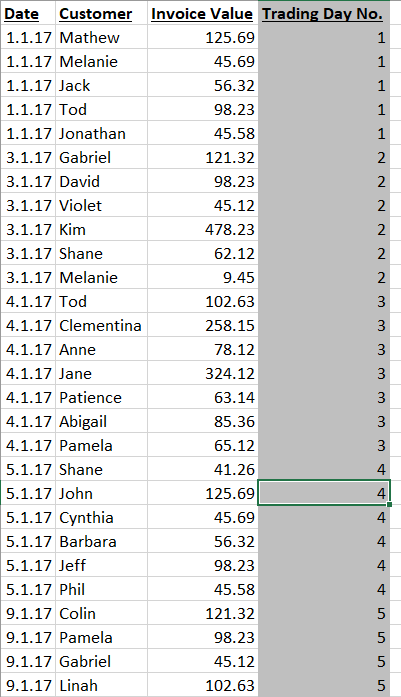
I am looking for some assistance in creating an index column called Trading Day No. based on the sorted date column. Index numbers should begin at 1 and all rows with the same date should have the same index number as highlighted in the attached. In Excel I am using the formula "=IF(A7=A6,D6,D6+1)". Please see pic below:


The grey column is what I am trying to createThe grey column is what I am trying to create


Thank you for your help


Herbz

1 ACCEPTED SOLUTION

Hi @Anonymous


With DAX you can achieve the same with RANKX


Add it as a calculated column


Trading Day No. =
RANKX ( TableName, TableName[Date],, ASC, DENSE )

View solution in original post

6 REPLIES 6
v-huizhn-msft
Microsoft Employee
Microsoft Employee

Hi @Anonymous,

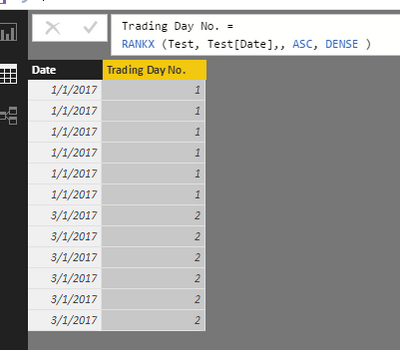
Please use the solution @Zubair_Muhammad posted, it works successfully after test.

expected resultexpected result
In addition, please mark the right reply as answer, so more members will get useful information or workaround easily.

Best Regards,
Angelia

My problem is very similar, I need to numbering the records for each day. The numbering for each day starts anew, i.e. from 1. Could you help?

Thanks.

Hello, did you find a way to create new numbering based on date? I also want to the same but not sure how
jthomson
Solution Sage
Solution Sage

Sounds like a job for Power Query - add steps where you:


- group your table by the date column

- sort it if needed

- add an index column

- join this new table back into what you had in your previous step by the date column, your index column should give you the output you wanted

Hi @Anonymous


With DAX you can achieve the same with RANKX


Add it as a calculated column


Trading Day No. =
RANKX ( TableName, TableName[Date],, ASC, DENSE )
Anonymous
Not applicable

Thank you very much, works perfectly


Much appreciated


Herbz

Helpful resources

Announcements
FabCon and SQLCon Barcelona 2026

FabCon & SQLCon – Barcelona 2026

Join us in Barcelona for FabCon and SQLCon, the Fabric, Power BI, SQL, and AI community event. Save €200 with code FABCMTY200.

Fabric Community Sticker Design Challenge Barcelona Carousel

Fabric Community Sticker Challenge - Barcelona 2026

If you love stickers, then you will definitely want to check out our community sticker challenge, Barcelona edition!

July Power BI Update Carousel

Power BI Monthly Update - July 2026

Check out the July 2026 Power BI update to learn about new features.

Power BI DataViz World Championships carousel

Power BI DataViz World Championships - June 2026

A new Power BI DataViz World Championship is coming this June! Don't miss out on submitting your entry.

Top Solution Authors