Get certified for free when you join Fabric Data Days 2026 and dive into Fabric, Power BI, SQL, AI, and other essential data skills.
Join nowTry your skills in the Power BI Dataviz World Championship! Round one ends June 26. Join now
Is it possible to use conditional formatting but base the format on a selection of a filter?
I have a measure that I want to display as red when over the value of 120. However, this 120 is monthly. So when a month is picked I want it to be red up to the value of 120, when no month is selected, I want it to be red if its over 1440 as this is 120x12.
Is this possible?
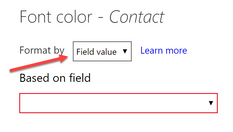
@Anonymous you can create measure to return the color and then use that in conditional formatting
KPI Color = VAR __value = SUM( Table[Amount] ) VAR __limit = IF( HASONEVALUE( Table[Month] ), 120, 1440 ) RETURN IF( __value > __limit, "RED" )
Now use this measure in conditional formatting. Change above measure as per you data set
Subscribe to the @PowerBIHowTo YT channel for an upcoming video on List and Record functions in Power Query!!
Learn Power BI and Fabric - subscribe to our YT channel - Click here: @PowerBIHowTo
If my solution proved useful, I'd be delighted to receive Kudos. When you put effort into asking a question, it's equally thoughtful to acknowledge and give Kudos to the individual who helped you solve the problem. It's a small gesture that shows appreciation and encouragement! ❤
Did I answer your question? Mark my post as a solution. Proud to be a Super User! Appreciate your Kudos 🙂
Feel free to email me with any of your BI needs.
| User | Count |
|---|---|
| 22 | |
| 22 | |
| 20 | |
| 19 | |
| 11 |
| User | Count |
|---|---|
| 65 | |
| 54 | |
| 46 | |
| 44 | |
| 31 |