Get certified for free when you join Fabric Data Days 2026 and dive into Fabric, Power BI, SQL, AI, and other essential data skills.
Join nowJuly 7 - July 17 | Round 2 of the Power BI Dataviz World Championships. Don't miss your chance! Learn more
Is it possible to use conditional formatting but base the format on a selection of a filter?
I have a measure that I want to display as red when over the value of 120. However, this 120 is monthly. So when a month is picked I want it to be red up to the value of 120, when no month is selected, I want it to be red if its over 1440 as this is 120x12.
Is this possible?
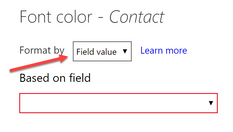
@Anonymous you can create measure to return the color and then use that in conditional formatting
KPI Color = VAR __value = SUM( Table[Amount] ) VAR __limit = IF( HASONEVALUE( Table[Month] ), 120, 1440 ) RETURN IF( __value > __limit, "RED" )
Now use this measure in conditional formatting. Change above measure as per you data set
Subscribe to the @PowerBIHowTo YT channel for an upcoming video on List and Record functions in Power Query!!
Learn Power BI and Fabric - subscribe to our YT channel - Click here: @PowerBIHowTo
If my solution proved useful, I'd be delighted to receive Kudos. When you put effort into asking a question, it's equally thoughtful to acknowledge and give Kudos to the individual who helped you solve the problem. It's a small gesture that shows appreciation and encouragement! ❤
Did I answer your question? Mark my post as a solution. Proud to be a Super User! Appreciate your Kudos 🙂
Feel free to email me with any of your BI needs.
Join us in Barcelona for FabCon and SQLCon, the Fabric, Power BI, SQL, and AI community event. Save €200 with code FABCMTY200.
Join Data Days 2026: 60 days of free live/on-demand sessions, challenges, study groups, and certification opportunities.
| User | Count |
|---|---|
| 28 | |
| 27 | |
| 25 | |
| 23 | |
| 17 |
| User | Count |
|---|---|
| 54 | |
| 46 | |
| 38 | |
| 28 | |
| 21 |