Don't miss your chance to take exam DP-600 or DP-700 on us!
Request nowLearn from the best! Meet the four finalists headed to the FINALS of the Power BI Dataviz World Championships! Register now
Hi,
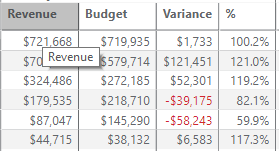
Just wondering if what I want to do is possible. I'm trying to use Conditonal Formatting on a measure. It's the % column as pictured below.
If the value of the measure is 100% or more, then, then I want the font colour to be green.
If the value of the measure is 99.9% or less, then I want the font colour to be red.
Here's my measure:
Solved! Go to Solution.
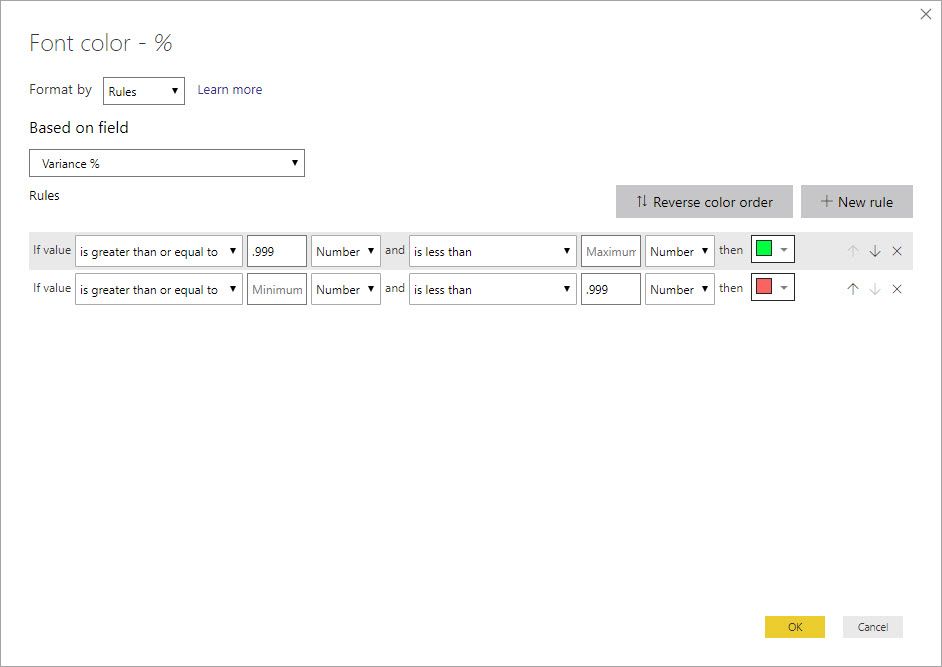
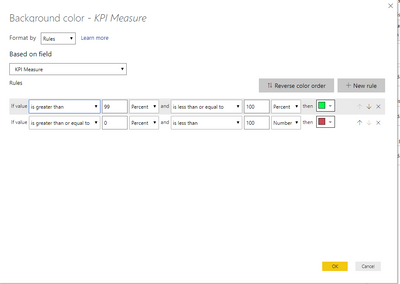
When you use the built in percent it is looking at the percent of the values meaning, if you have 10 values and set it to > 90 percent it will format the highest value only. It has nothing to do with the % number you are displaying. What you want to use is Number like so:
@abloor ,
I believe you just need a second rule.
If this solves your issues, please mark it as the solution, so that others can find it easily. Kudos are nice too.
Nathaniel
Proud to be a Super User!
When you use the built in percent it is looking at the percent of the values meaning, if you have 10 values and set it to > 90 percent it will format the highest value only. It has nothing to do with the % number you are displaying. What you want to use is Number like so:
Share feedback directly with Fabric product managers, participate in targeted research studies and influence the Fabric roadmap.
Check out the February 2026 Power BI update to learn about new features.
| User | Count |
|---|---|
| 54 | |
| 47 | |
| 39 | |
| 16 | |
| 15 |
| User | Count |
|---|---|
| 82 | |
| 69 | |
| 39 | |
| 29 | |
| 27 |