Join us at FabCon Atlanta from March 16 - 20, 2026, for the ultimate Fabric, Power BI, AI and SQL community-led event. Save $200 with code FABCOMM.
Register now!Learn from the best! Meet the four finalists headed to the FINALS of the Power BI Dataviz World Championships! Register now
Hello,
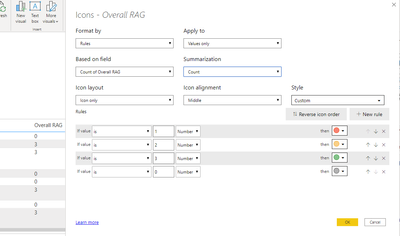
I am struggling with some conditional formatting.
When I put this condition in place, the numbers are mixed up. I have tried to change the summarisation but it is not allowing me.
Any suggestions?
Hi @deanbland ,
What's the meaning of "the numbers are mixed up"? Could you please share some sample data (exclude sensitive data) and your expected result in order to provide you a suitable solution? Thank you.
In addition, you can refer the following documentations to get it.
Conditional Formatting Using Icons In Power BI
Best Regards
Community Support Team _ Rena Ruan
If this post helps, then please consider Accept it as the solution to help the other members find it more.
Share feedback directly with Fabric product managers, participate in targeted research studies and influence the Fabric roadmap.
Check out the February 2026 Power BI update to learn about new features.
| User | Count |
|---|---|
| 50 | |
| 49 | |
| 35 | |
| 15 | |
| 14 |
| User | Count |
|---|---|
| 92 | |
| 75 | |
| 41 | |
| 26 | |
| 25 |