This time we’re going bigger than ever. Fabric, Power BI, SQL, AI and more. We're covering it all. You won't want to miss it.
Learn moreLevel up your Power BI skills this month - build one visual each week and tell better stories with data! Get started
Is there any way to apply conditional formatting on percentages in a table?
Hi,
Has anyone found a way to do this yet?
Thanks
Hi @KH11NDR , @Bt123 , @aslee , @rlien1 , @Anonymous
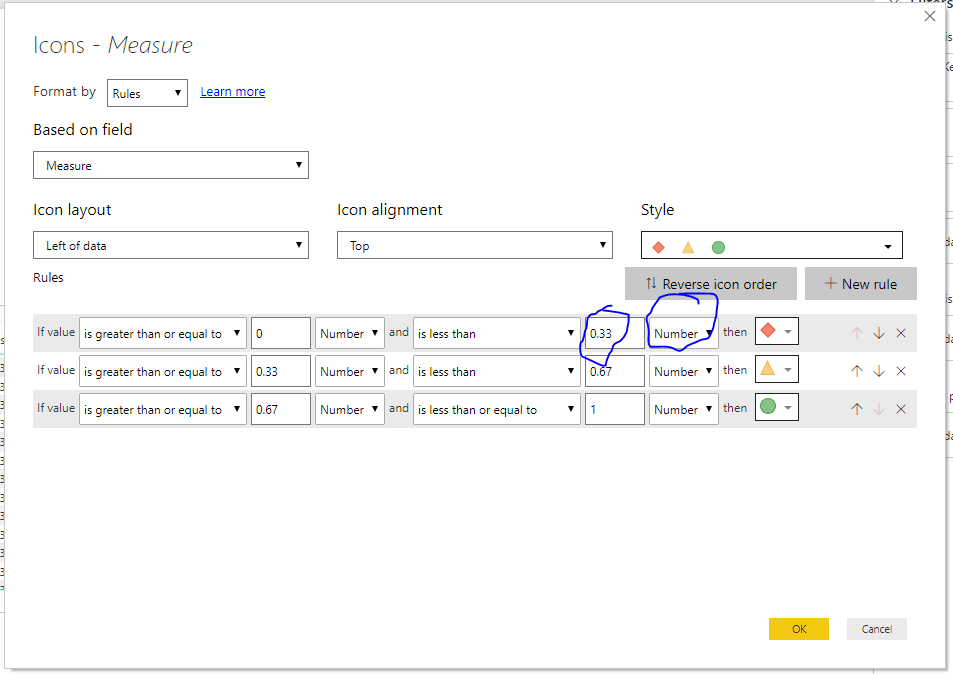
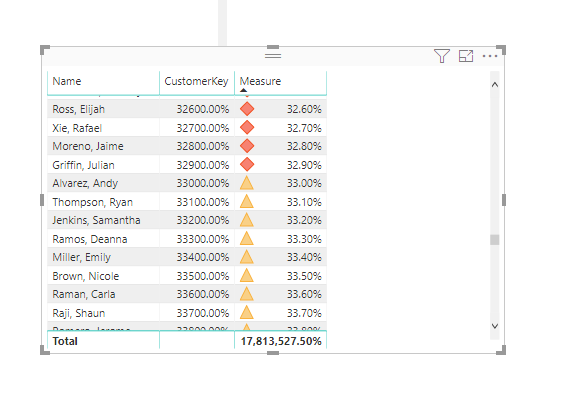
See my top picture, save your rule as decimals, and use number. I forget why this works this way, but there is a reason. Something to do with percentage meaning a percentage of all your values.
Let me know if you have any questions.
If this solves your issues, please mark it as the solution, so that others can find it easily. Kudos
are nice too.
Nathaniel
Proud to be a Super User!
Hi @Bt123,
>>Is there any way to apply conditional formatting on percentages in a table?
Current power bi conditional format feature not support text, you can calculate the result as decimal, then switch the display mode(percent) at modding panel.
Regards,
Xiaoxin Sheng
Power BI handles percentages as text? I'm confused.
If I want to apply a conditional format to all values above 85%, I try entering 0.85 or 85 or 85% in the conditional formatting input fields. Power BI unfortunately applies the formatting to all values in the table, including those less than 85%.
My percentage is a result of a quick calc (% of column total).
Has anyone found a solution to this? I am having trouble with this too.
Can you elaborate little more what you mean by conditional formatting?
Subscribe to the @PowerBIHowTo YT channel for an upcoming video on List and Record functions in Power Query!!
Learn Power BI and Fabric - subscribe to our YT channel - Click here: @PowerBIHowTo
If my solution proved useful, I'd be delighted to receive Kudos. When you put effort into asking a question, it's equally thoughtful to acknowledge and give Kudos to the individual who helped you solve the problem. It's a small gesture that shows appreciation and encouragement! ❤
Did I answer your question? Mark my post as a solution. Proud to be a Super User! Appreciate your Kudos 🙂
Feel free to email me with any of your BI needs.
Check out the April 2026 Power BI update to learn about new features.
Sign up to receive a private message when registration opens and key events begin.
If you have recently started exploring Fabric, we'd love to hear how it's going. Your feedback can help with product improvements.
| User | Count |
|---|---|
| 31 | |
| 25 | |
| 21 | |
| 18 | |
| 17 |
| User | Count |
|---|---|
| 62 | |
| 35 | |
| 34 | |
| 24 | |
| 24 |