Don't miss your chance to take the Fabric Data Engineer (DP-600) exam for FREE! Find out how by attending the DP-600 session on April 23rd (pacific time), live or on-demand.
Learn moreNext up in the FabCon + SQLCon recap series: The roadmap for Microsoft SQL and Maximizing Developer experiences in Fabric. All sessions are available on-demand after the live show. Register now
Hi All,
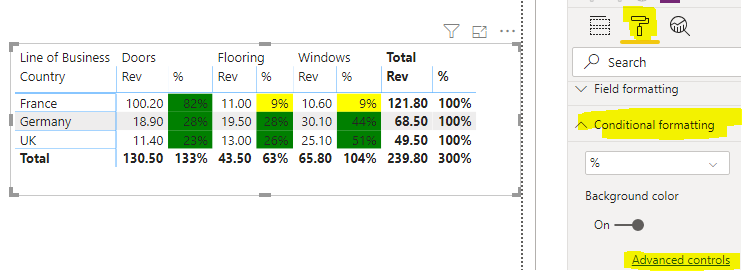
I have set up conditional formatting on a Matrix table with 4 levels of rows, values has 2, revenue and the % of that revenue against the Row total...
Now I put the conditional formatting on this % field and set it 0-5% = Red 6-10% = Amber 11-100% = Green.
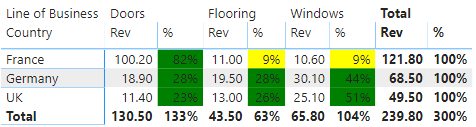
But whatever logic PowerBi is using its not making sense on the table, ie I have a row with 12% in the % field but its coming up as Red?
What does PowerBi work its Percentages off and is there a way to change this? or some alternative.
Thanks,
Solved! Go to Solution.
Hi @Anonymous ,
I create a simple sample that you could have a try. And you can use any of the values listed in the CSS color spec at https://www.w3.org/TR/css-color-3/ to color your visuals. In my sample, I use text to color it. Please view the sample below.
Conditional formatting =
SWITCH (
TRUE (),
'Table'[%] <= 0.05, "Red",
'Table'[%] <= 0.1, "Yellow",
"Green"
)
Best Regards,
Xue Ding
If this post helps, then please consider Accept it as the solution to help the other members find it more quickly.
Hi @rgodavarthy ,
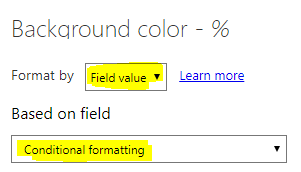
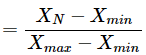
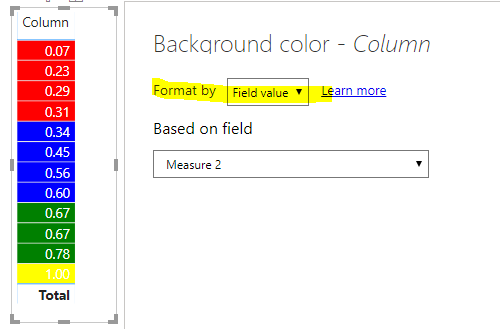
It is by design. The percentage is calculated based on Range.
Percentage(in conditional formatting)
You could try to create DAX formulas to apply that color to the background of font color of a table or matrix visual. For more details, you could try my sample.
Reference:
Best Regards,
Xue Ding
If this post helps, then please consider Accept it as the solution to help the other members find it more quickly.
Thank you @v-xuding-msft this is really helpful!
I am struggling as to how to implement it though as I am not measuring against a goal but a % of the Row total in a Matrix so the only field I have is Revenue against millions of rows.
The Matrix looks something like this
| Line of Business | Windows | Doors | Flooring | Total | ||||
| Country | Rev | % | Rev | % | Rev | % | Rev | % |
| UK | 25.1 | 51% | 11.4 | 23% | 13 | 26% | 49.5 | 100% |
| France | 10.6 | 9% | 100.2 | 82% | 11 | 9% | 121.8 | 100% |
| Germany | 30.1 | 44% | 18.9 | 28% | 19.5 | 28% | 68.5 | 100% |
| Total | 65.8 | 27% | 130.5 | 54% | 43.5 | 18% | 239.8 | 100% |
There are sublevels below those in the matrix also going down at least 4 or more levels.
Thanks again for the help!
Hi @Anonymous ,
I create a simple sample that you could have a try. And you can use any of the values listed in the CSS color spec at https://www.w3.org/TR/css-color-3/ to color your visuals. In my sample, I use text to color it. Please view the sample below.
Conditional formatting =
SWITCH (
TRUE (),
'Table'[%] <= 0.05, "Red",
'Table'[%] <= 0.1, "Yellow",
"Green"
)
Best Regards,
Xue Ding
If this post helps, then please consider Accept it as the solution to help the other members find it more quickly.
If you have recently started exploring Fabric, we'd love to hear how it's going. Your feedback can help with product improvements.
A new Power BI DataViz World Championship is coming this June! Don't miss out on submitting your entry.
| User | Count |
|---|---|
| 47 | |
| 43 | |
| 39 | |
| 20 | |
| 15 |
| User | Count |
|---|---|
| 68 | |
| 68 | |
| 31 | |
| 27 | |
| 24 |