cancel
Showing results for 
Search instead for 
Did you mean: 

The Power BI Data Visualization World Championships is back! Get ahead of the game and start preparing now! Learn more

Reply
abgnfirdaus
Helper I
Helper I

Conditional Formatting for Excel

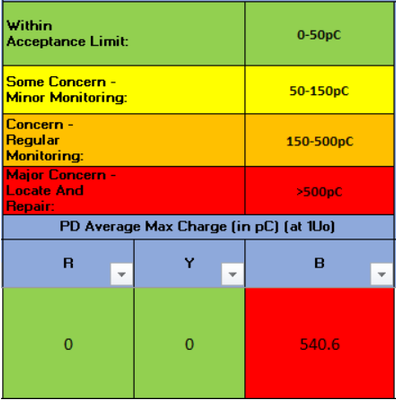
Hello there, sorry for asking topics not relevant to Power BI. The question is for Microsoft Excel. Hope you guys can help me!


abgnfirdaus_3-1644453048716.png

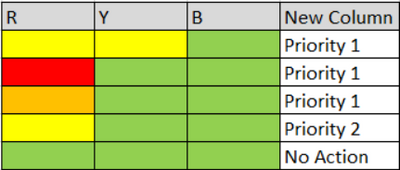
I want to make Conditional Formatting based on colour in columns R, Y and B. I will make new column next to the column B. The new will use to show the result based on the colour in columns R, Y and B. So the new excel should be like this:


abgnfirdaus_4-1644453082514.png


So meaning that:

  • 2 Yellow = Priority 1
  • 1 Red = Priority 1
  • 1 Orange = Priority 1
  • 1 Yellow, 2 Green =  Priority 2
  • All Green = No Action

Hope you guys can guide me. Thank you. 


1 REPLY 1
amitchandak
Super User
Super User

@abgnfirdaus , Please post it on excel forum


refer

https://www.excel-easy.com/data-analysis/conditional-formatting.html

https://www.youtube.com/watch?v=XHT4paRaY4g

Share with Power BI Enthusiasts: Full Power BI Video (20 Hours) YouTube
Microsoft Fabric Series 60+ Videos YouTube
Microsoft Fabric Hindi End to End YouTube

Helpful resources

Announcements
Power BI DataViz World Championships

Power BI Dataviz World Championships

The Power BI Data Visualization World Championships is back! Get ahead of the game and start preparing now!

December 2025 Power BI Update Carousel

Power BI Monthly Update - December 2025

Check out the December 2025 Power BI Holiday Recap!

FabCon Atlanta 2026 carousel

FabCon Atlanta 2026

Join us at FabCon Atlanta, March 16-20, for the ultimate Fabric, Power BI, AI and SQL community-led event. Save $200 with code FABCOMM.