cancel
Showing results for 
Search instead for 
Did you mean: 

The Power BI Data Visualization World Championships is back! Get ahead of the game and start preparing now! Learn more

Reply
tavolo89
Frequent Visitor

Conditional Formatting for Any Measure

I would like to create a single calculation which I can re-use to apply the same conditional formatting for any measure. For example:


SWITCH( TRUE(), SELECTEDMEASURE() >=0,"green", SELECTEDMEASURE() <0,"red", "yellow" )

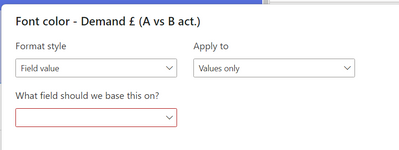
I expect to then be able to reference this using the "field value" in the conditional formatting UI:


tavolo89_0-1680699274815.png


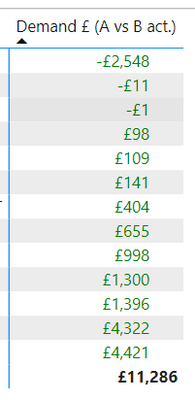
How can I do this? The above steps just colours all measure values green:


tavolo89_1-1680699274816.png


Using a calculation group I can dynamically change the text, but can't use it to colour the measure value accordingly. Regardless, I don't seem able to show my measure and the calculation group at the same time.


This does not seem to be as simple as I expected. The alternative is to apply a "rules based" conditional formatting to every measure, in every matrix which I would rather avoid.


Thanks for any help!


1 REPLY 1
GG23
New Member

Have you found a solution for this? I'm needing the same. Thanks

Helpful resources

Announcements
Power BI DataViz World Championships

Power BI Dataviz World Championships

The Power BI Data Visualization World Championships is back! Get ahead of the game and start preparing now!

December 2025 Power BI Update Carousel

Power BI Monthly Update - December 2025

Check out the December 2025 Power BI Holiday Recap!

FabCon Atlanta 2026 carousel

FabCon Atlanta 2026

Join us at FabCon Atlanta, March 16-20, for the ultimate Fabric, Power BI, AI and SQL community-led event. Save $200 with code FABCOMM.