cancel
Showing results for 
Search instead for 
Did you mean: 

The Power BI Data Visualization World Championships is back! Get ahead of the game and start preparing now! Learn more

Reply
Unicorn_Tech
Resolver I
Resolver I

Conditional Formatting based on time

Apologies if this is a duplicate post.


I would like to set up conditional formatting, comparing one value in a column to another value in a column (for the same row.)  I want to know if Monthly Average Time on a Page is larger than the Yeary Average Time on a Page.


Sample table:

PageMonthly AverageYearly Average
Home Page01:3201:28
about Page00:5201:20


Ideally, for the above table, the Monthly Average for "Home Page" would be bold, and the Yearly Average for "About Page" would be bold.


This is more complicated because this is a time value.  I'm assuming I would have better luck using the raw decimal data to do the comparison of greater than?  The above is correct, but it's formatted to show a correct value.

1 ACCEPTED SOLUTION
negi007
Community Champion
Community Champion

@Unicorn_Tech  Can you please try doing it below if helps you.


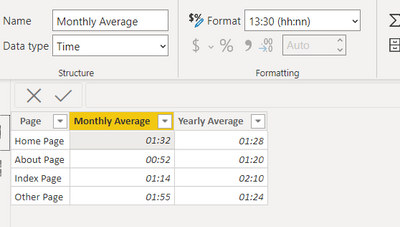
Change the time value to below

negi007_1-1611240479444.png


then create one measure like 

Check = if (SUM(Page[Yearly Average])>SUM(Page[Monthly Average]),1,0)
 
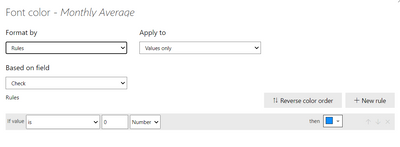
then set the rules like below for both monthly average and Yearly Average
negi007_5-1611240588678.png

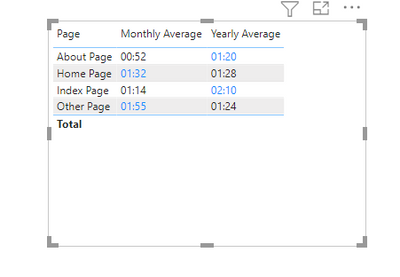
below is the ouput

negi007_0-1611240441585.png


Did I answer your question? Mark my post as a solution!
Appreciate your Kudos


Proud to be a Super User!


Follow me on linkedin

View solution in original post

2 REPLIES 2
negi007
Community Champion
Community Champion

@Unicorn_Tech  Can you please try doing it below if helps you.


Change the time value to below

negi007_1-1611240479444.png


then create one measure like 

Check = if (SUM(Page[Yearly Average])>SUM(Page[Monthly Average]),1,0)
 
then set the rules like below for both monthly average and Yearly Average
negi007_5-1611240588678.png

below is the ouput

negi007_0-1611240441585.png


Did I answer your question? Mark my post as a solution!
Appreciate your Kudos


Proud to be a Super User!


Follow me on linkedin

Thank you so much!

Helpful resources

Announcements
Power BI DataViz World Championships

Power BI Dataviz World Championships

The Power BI Data Visualization World Championships is back! Get ahead of the game and start preparing now!

November Power BI Update Carousel

Power BI Monthly Update - November 2025

Check out the November 2025 Power BI update to learn about new features.

FabCon Atlanta 2026 carousel

FabCon Atlanta 2026

Join us at FabCon Atlanta, March 16-20, for the ultimate Fabric, Power BI, AI and SQL community-led event. Save $200 with code FABCOMM.