Don't miss your chance to take the Fabric Data Engineer (DP-700) exam on us!
Learn moreWe've captured the moments from FabCon & SQLCon that everyone is talking about, and we are bringing them to the community, live and on-demand. Starts on April 14th. Register now
Hi All
Conditional formatting is easy enough to understand, but I am struggling to apply it in the way I want, so need some help.
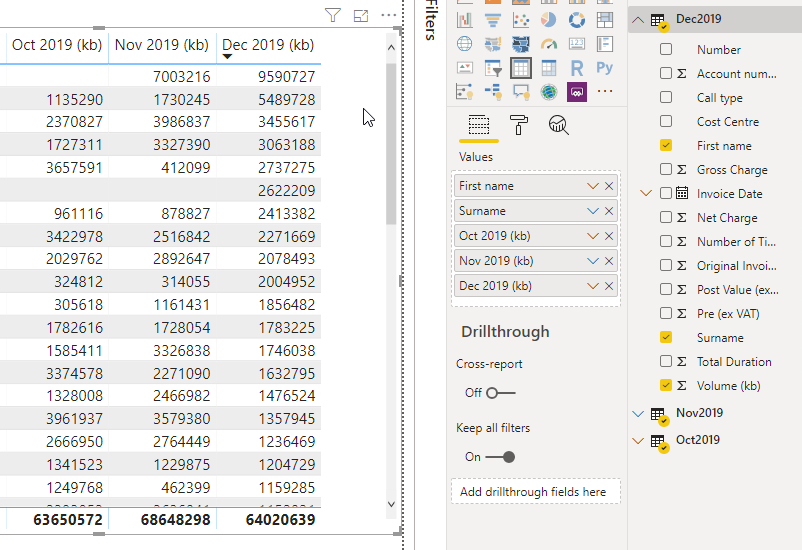
Here is my basic table. It shows data use over a couple of months, and I want to simply highlight if that particular user has increased or decreased their use each month.
The data comes from 3 seperate data sources whcih will be added to up to a max 6 month period.
But how do i ask conditional formatting to look at the previous column, then format accordingly?!
Any help most welcome.....thanks
Hi @Anonymous
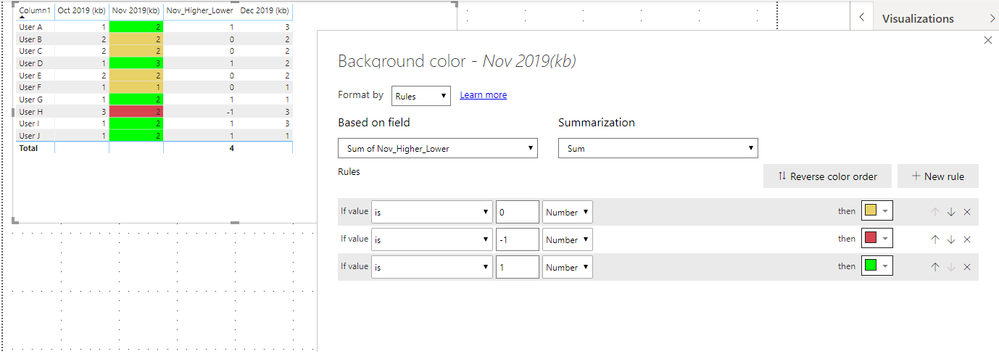
You should be able to use something similar to this:
I created a new Calcultated Column called 'Nov_Higher_Lower' in this column I return a value of -1, 0 or 1 depending on the sign of the number when I subtract Novembers value from Octobers value.
Thanks for the suggestion @Anonymous - appreciate the help, but seems there is an issue reading the October data - which is on a seperate data source?
Used the following:
But the result is:
A single value for column 'Volume (kb)' in table 'Oct2019' cannot be determined. This can happen when a measure formula refers to a column that contains many values without specifying an aggregation such as min, max, count, or sum to get a single result.
If you have recently started exploring Fabric, we'd love to hear how it's going. Your feedback can help with product improvements.
A new Power BI DataViz World Championship is coming this June! Don't miss out on submitting your entry.
Share feedback directly with Fabric product managers, participate in targeted research studies and influence the Fabric roadmap.
| User | Count |
|---|---|
| 56 | |
| 40 | |
| 36 | |
| 20 | |
| 18 |
| User | Count |
|---|---|
| 74 | |
| 72 | |
| 38 | |
| 35 | |
| 26 |