Join us at FabCon Atlanta from March 16 - 20, 2026, for the ultimate Fabric, Power BI, AI and SQL community-led event. Save $200 with code FABCOMM.
Register now!Vote for your favorite vizzies from the Power BI Dataviz World Championship submissions. Vote now!
Hi All,
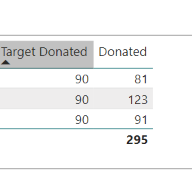
I need some help with conditional formatting on my report. I have 2 columns (Target & Actual - Data below) and wanted to add the following rules and give a RAG rating.
if actual is less <98% of target then Red
if actual is between 98%-99.99% of target the Amber
if actual is >=100% then Green
Can someone advise then best way of doing this please? I am new to Power BI and my knowledge is very limited at the moment so a step by step tutorial would be a great help.
Thanks
Abz
Solved! Go to Solution.
Hi @Abz_17
You can create this measure
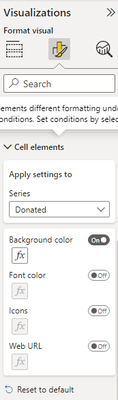
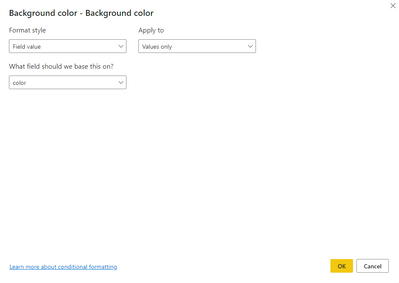
and click on the "fx" to add that measure as field value in order to apply the specific colors
If this post helps, accept it as a solution
Hi @Abz_17
You can create this measure
and click on the "fx" to add that measure as field value in order to apply the specific colors
If this post helps, accept it as a solution
Vote for your favorite vizzies from the Power BI World Championship submissions!
If you love stickers, then you will definitely want to check out our Community Sticker Challenge!
Check out the January 2026 Power BI update to learn about new features.
| User | Count |
|---|---|
| 58 | |
| 53 | |
| 43 | |
| 17 | |
| 16 |
| User | Count |
|---|---|
| 123 | |
| 108 | |
| 44 | |
| 32 | |
| 24 |