Join us at FabCon Atlanta from March 16 - 20, 2026, for the ultimate Fabric, Power BI, AI and SQL community-led event. Save $200 with code FABCOMM.
Register now!The Power BI Data Visualization World Championships is back! Get ahead of the game and start preparing now! Learn more
Hi,
The conditional formatting I am attempting seems very straightforward but I cannot get it to show correctly.
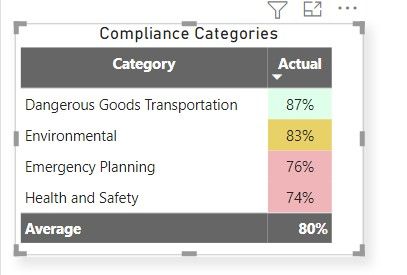
I have a table of the average compliance across all location by category.
Category is not summarized and Actual is averaged on the values in the visualization pane. It pulls from the 'Actual Compliance' field. Each location is scored in four compliance categories. I am showing the average in all four catgories across all locations. The column is formatted as a percentage.
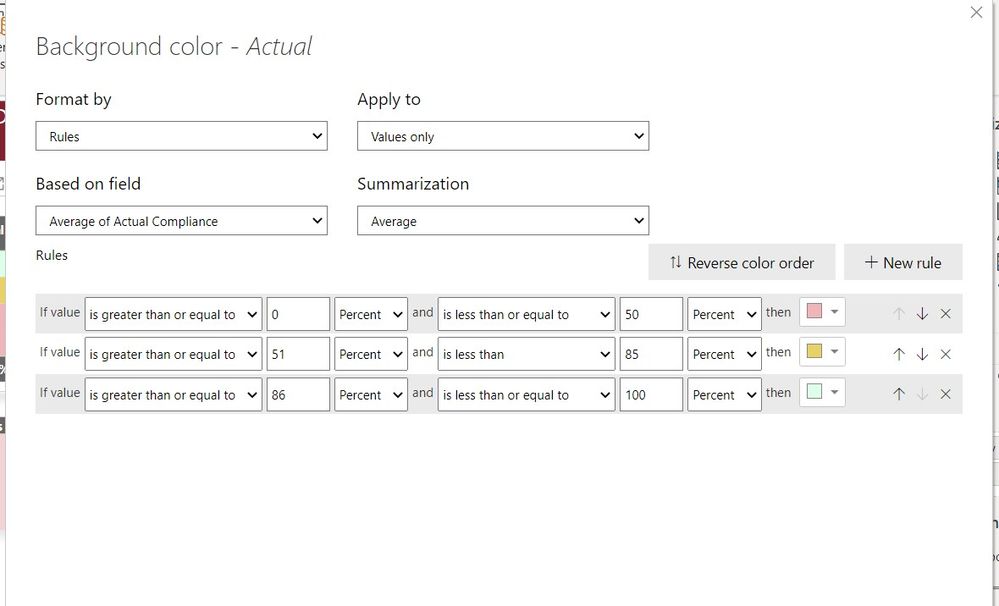
I have set Background Conditional formatting to show the following:
But the result is this:
I found several posts saying the Number designation with ratios needed to be used for conditional formatting with percentages. When I try that, I lose all conditional formatting.
Am I doing something wrong or is this not possible with this type of data? What format do I need this in to achieve the same visual AND have conditional formatting?
Thanks.
Solved! Go to Solution.
Hi @bhard ,
You problem here is a question about format of the numbers you input in your rule, being a percentage the values are all in the 100 base so instead of making it the percentage value 0 - 50, 51 - 85 and 86-100 you need to select the numbers and make them until 1.
In this case you need to select the 0 - 0.5, 0.51-0.85 and 0.86 - 1 and change the percent to number.
This will return the correct value.
The percetage that you see using the rule is the percentage of values meaning that for the first rule the values that are in the first 50% of the calculations get the red colour. so that is why the to lowest values are marked because you have 4 values so 50% is 2.
Regards
Miguel Félix
Proud to be a Super User!
Check out my blog: Power BI em PortuguêsHi @bhard ,
You problem here is a question about format of the numbers you input in your rule, being a percentage the values are all in the 100 base so instead of making it the percentage value 0 - 50, 51 - 85 and 86-100 you need to select the numbers and make them until 1.
In this case you need to select the 0 - 0.5, 0.51-0.85 and 0.86 - 1 and change the percent to number.
This will return the correct value.
The percetage that you see using the rule is the percentage of values meaning that for the first rule the values that are in the first 50% of the calculations get the red colour. so that is why the to lowest values are marked because you have 4 values so 50% is 2.
Regards
Miguel Félix
Proud to be a Super User!
Check out my blog: Power BI em PortuguêsThe Power BI Data Visualization World Championships is back! Get ahead of the game and start preparing now!
| User | Count |
|---|---|
| 38 | |
| 36 | |
| 33 | |
| 33 | |
| 29 |
| User | Count |
|---|---|
| 134 | |
| 96 | |
| 78 | |
| 67 | |
| 65 |