Join us at FabCon Atlanta from March 16 - 20, 2026, for the ultimate Fabric, Power BI, AI and SQL community-led event. Save $200 with code FABCOMM.
Register now!Learn from the best! Meet the four finalists headed to the FINALS of the Power BI Dataviz World Championships! Register now
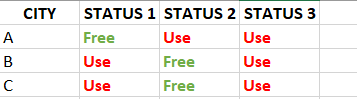
Hi I have question how to use Conditional Formatting Text with Color
Many thank
Hi @Anonymous ,
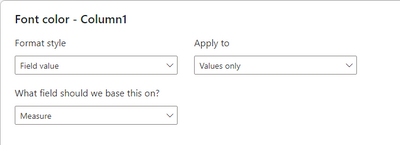
Use measure return a text in the format of CSS color spec or color sting ,Or column contains color string.
And Format style -> Field value, What field should we base this on? -> Measure or column
For more details you can refer official article.
Conditional table formatting in Power BI Desktop - Power BI | Microsoft Docs
Best Regards
Community Support Team _ chenwu zhu
If this post helps, then please consider Accept it as the solution to help the other members find it more quickly.
@Anonymous , You can create a color measure like this and use in conditional formatting using field value option
if(Max(Table[Status1]) = "Free" , "Green", "Red")
or
How to do conditional formatting by measure and apply it on pie? : https://youtu.be/RqBb5eBf_I4
if(Max(Table[Status]) = "Free" , "Green", "Red")
Share feedback directly with Fabric product managers, participate in targeted research studies and influence the Fabric roadmap.
Check out the February 2026 Power BI update to learn about new features.
| User | Count |
|---|---|
| 50 | |
| 49 | |
| 35 | |
| 15 | |
| 14 |
| User | Count |
|---|---|
| 92 | |
| 75 | |
| 41 | |
| 26 | |
| 25 |