cancel
Showing results for 
Search instead for 
Did you mean: 

Data Days is here! Join us now for 60+ days of learning, challenges, and connection. Learn more

Reply
Anonymous
Not applicable

Conditional Formatting Table

Hello!


Hoping to get some help here.


I have a data set with Customer Name, OrderID, Promise Date, Ship Date, and Order Amount. 


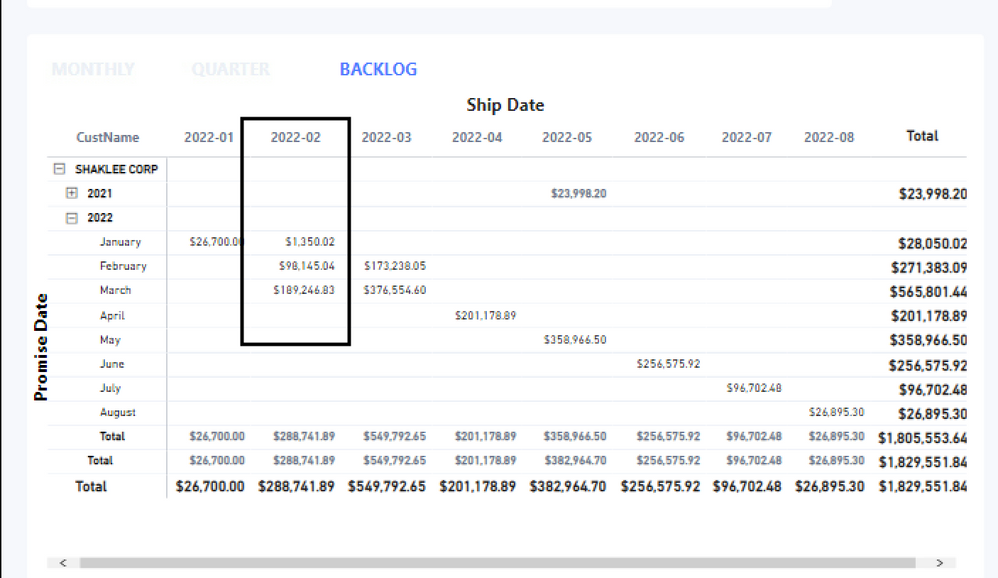
I'm grouping the data by Customer and Month (see below).  I would like to conditionally format those orders where the ship month (column) is either before or after compared to the (row) promise month (i.e. early, on time, late). If possible, I'm trying to ignore the Day and simply compare the month (i.e. Shipping Feb 3rd with a Promise date of Feb. 5th is the same month).


For example- 

We're shipping $1,350.02 in 2022-02 where the promise date was 2022-01, cell would be red (late). 

$98,145.04 is shipping 2022-02 and promised in 2022-01, cell would be white (on time).

$189,246.83 is shipping in 2022-02 and is promised in 2022-03, cell would be blue (shipping early).


Untitled.png


thanks in advance!

1 ACCEPTED SOLUTION
sevenhills
Super User
Super User

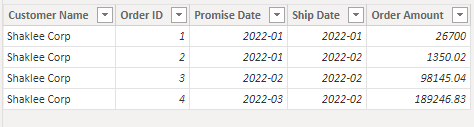
Without data pasted or PBIX file, it is tough. But, your explanation is perfect! Tried with only four values...


Data

sevenhills_0-1642817486830.png


Measure


Font color = 

var _a = Max('Table'[Ship Date])
var _b = Max('Table'[Promise Date])
var _m = datediff(_a, _b, month)

return switch (
  true (),
  _m > 0, "blue",
  _m < 0 , "red",
  ""
)


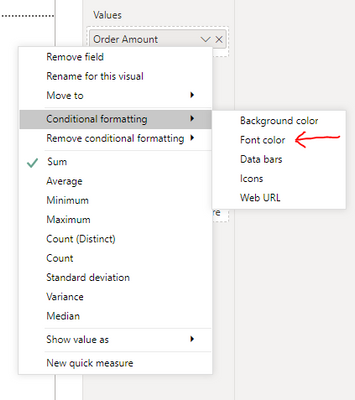
Color setting


sevenhills_3-1642817923799.png


sevenhills_2-1642817891624.png


output

sevenhills_1-1642817829430.png


View solution in original post

2 REPLIES 2
Anonymous
Not applicable

Excellent!  thank you!

sevenhills
Super User
Super User

Without data pasted or PBIX file, it is tough. But, your explanation is perfect! Tried with only four values...


Data

sevenhills_0-1642817486830.png


Measure


Font color = 

var _a = Max('Table'[Ship Date])
var _b = Max('Table'[Promise Date])
var _m = datediff(_a, _b, month)

return switch (
  true (),
  _m > 0, "blue",
  _m < 0 , "red",
  ""
)


Color setting


sevenhills_3-1642817923799.png


sevenhills_2-1642817891624.png


output

sevenhills_1-1642817829430.png


Helpful resources

Announcements
Fabric Data Days is here Carousel

Fabric Data Days 2026

Don't miss out on Data Days, June 15 through August 7. Learn Fabric, Power BI, SQL, AI and more.

May Power BI Update Carousel

Power BI Monthly Update - May 2026

Check out the May 2026 Power BI update to learn about new features.

Power BI DataViz World Championships carousel

Power BI DataViz World Championships - June 2026

A new Power BI DataViz World Championship is coming this June! Don't miss out on submitting your entry.