cancel
Showing results for 
Search instead for 
Did you mean: 

The Power BI Data Visualization World Championships is back! It's time to submit your entry. Live now!

Reply
Anonymous
Not applicable

Conditional Formatting Rule not applying correctly

Hi, 


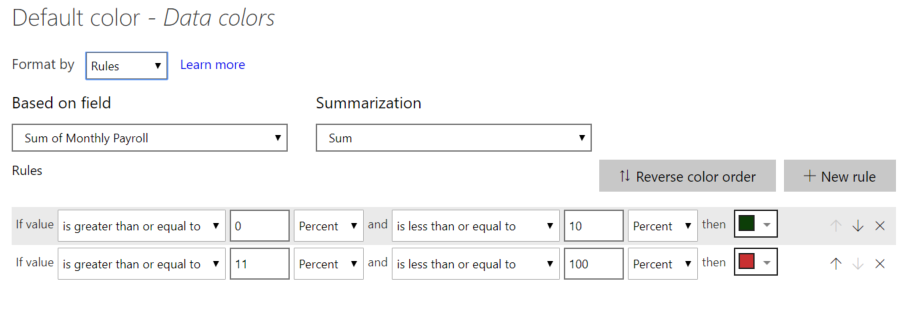
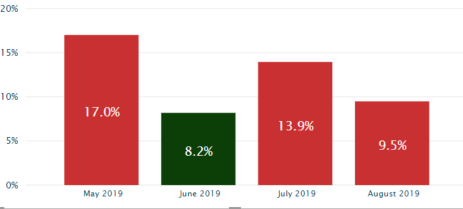
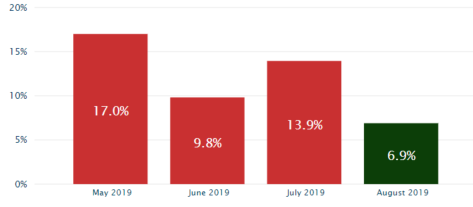
I have set up my conditional formatting rule as below so that if a value is below 10 the bar will be green, & if above 10 it'll be red, however I am getting altering results when my filters are applied & it is not correctly colouring the bars: 

rule.PNGexample.PNGexample 2.PNG

1 ACCEPTED SOLUTION
v-eachen-msft
Community Support
Community Support

Hi @Anonymous ,


You can use another way to set rules.
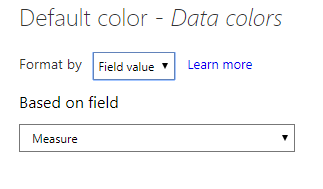
Create a new measure to set colors.

Measure =
IF ( SELECTEDVALUE ( test[Column1] ) > 0.1, "red", "green" )

Then apply it.
2-1.PNG

Here is the result.
2-2.PNG


Best Regards,

Eads


If this post helps, then please consider Accept it as the solution to help the other members find it more quickly.

Community Support Team _ Eads
If this post helps, then please consider Accept it as the solution to help the other members find it.

View solution in original post

2 REPLIES 2
v-eachen-msft
Community Support
Community Support

Hi @Anonymous ,


You can use another way to set rules.
Create a new measure to set colors.

Measure =
IF ( SELECTEDVALUE ( test[Column1] ) > 0.1, "red", "green" )

Then apply it.
2-1.PNG

Here is the result.
2-2.PNG


Best Regards,

Eads


If this post helps, then please consider Accept it as the solution to help the other members find it more quickly.

Community Support Team _ Eads
If this post helps, then please consider Accept it as the solution to help the other members find it.
Anonymous
Not applicable

Thanks for the reply, a handy measure to know 🙂 

Helpful resources

Announcements
FabCon Atlanta 2026 carousel

FabCon Atlanta 2026

Join us at FabCon Atlanta, March 16-20, for the ultimate Fabric, Power BI, AI and SQL community-led event. Save $200 with code FABCOMM.