cancel
Showing results for 
Search instead for 
Did you mean: 

Learn from the best! Meet the four finalists headed to the FINALS of the Power BI Dataviz World Championships! Register now

Reply
emaxon
Frequent Visitor

Conditional Formatting Not Working

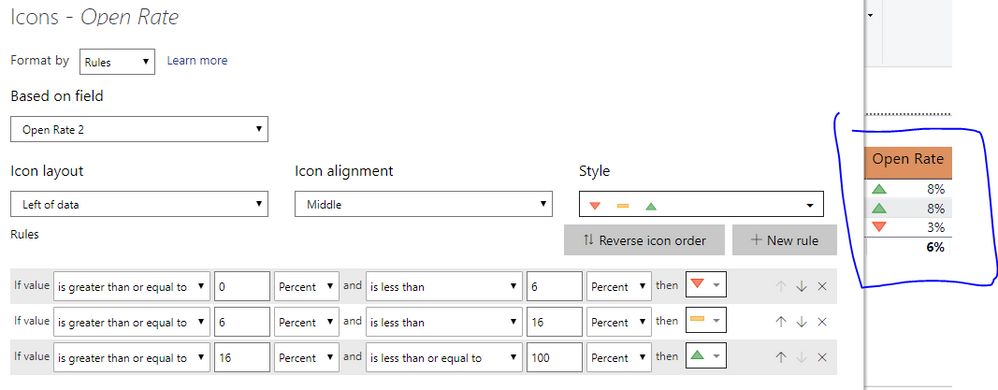
I am having touble with the Conditional Formatting in Power BI. Here are my rules.

Capture.PNG


Each of the 8% rows should be the yellow -- icon. Does anyone know what I am doing wrong?


1 ACCEPTED SOLUTION
PANDAmonium
Resolver IV
Resolver IV

I believe percentages in conditional formatting are based on your data range. So if .08 is the highest value for Open Rate, it will be in the 100% range of your values. And if .03 is at the bottom, it will fall in the 0% range of your values. I rarely use percentages for conditional formatting so that may not be accurate.


But depending on how your data looks, what you'll probably want to do is something like. If open date is gte 0 and lt .06 number, then red and so on.

View solution in original post

1 REPLY 1
PANDAmonium
Resolver IV
Resolver IV

I believe percentages in conditional formatting are based on your data range. So if .08 is the highest value for Open Rate, it will be in the 100% range of your values. And if .03 is at the bottom, it will fall in the 0% range of your values. I rarely use percentages for conditional formatting so that may not be accurate.


But depending on how your data looks, what you'll probably want to do is something like. If open date is gte 0 and lt .06 number, then red and so on.

Helpful resources

Announcements
Join our Fabric User Panel

Join our Fabric User Panel

Share feedback directly with Fabric product managers, participate in targeted research studies and influence the Fabric roadmap.

February Power BI Update Carousel

Power BI Monthly Update - February 2026

Check out the February 2026 Power BI update to learn about new features.

FabCon Atlanta 2026 carousel

FabCon Atlanta 2026

Join us at FabCon Atlanta, March 16-20, for the ultimate Fabric, Power BI, AI and SQL community-led event. Save $200 with code FABCOMM.