
cancel
Showing results for 
Search instead for 
Did you mean: 

Learn from the best! Meet the four finalists headed to the FINALS of the Power BI Dataviz World Championships! Register now

Reply
justnoob08
Frequent Visitor

Conditional Formatting Not Working properly when Filtered

Hi, I'm facing an unusual scenario using conditional Formatting ICON.


I'm working on an Availability report that uses Icons to see if it passed,warning, or it failed.


justnoob08_0-1618657876994.png

It shows the correct result when 

justnoob08_1-1618657932686.png

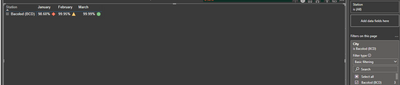
But when I specifically Filter that City/Station below is the result

justnoob08_2-1618658079989.png


I don't understand what is happening. Hope someone can enlighten me. Thank you!


1 ACCEPTED SOLUTION
negi007
Community Champion
Community Champion

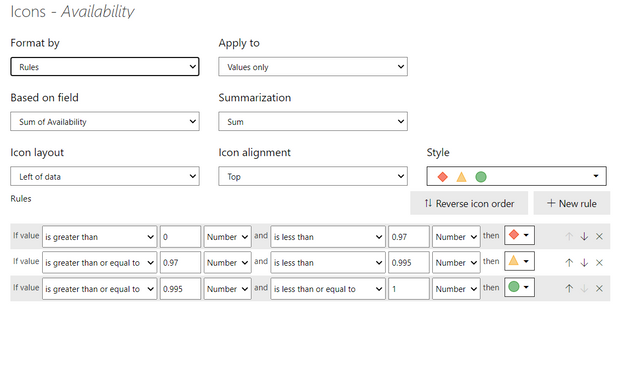
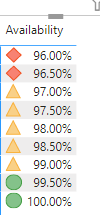
@justnoob08 can you change the condition like below see if it works for you. instead of percent use number


negi007_1-1618659417406.png

negi007_2-1618659452289.png


Did I answer your question? Mark my post as a solution!
Appreciate your Kudos


Proud to be a Super User!


Follow me on linkedin

View solution in original post

3 REPLIES 3
negi007
Community Champion
Community Champion

@justnoob08 can you change the condition like below see if it works for you. instead of percent use number


negi007_1-1618659417406.png

negi007_2-1618659452289.png


Did I answer your question? Mark my post as a solution!
Appreciate your Kudos


Proud to be a Super User!


Follow me on linkedin

Thank You for the help, the number converstion worked!

Anonymous
Not applicable

Hello @justnoob08 
You can change Apply to "Values and totals" instead of "values only" and check.
If it doesn't work as expected please share your sample data or pbix file after removing the sensitive information.

Helpful resources

Announcements
Join our Fabric User Panel

Join our Fabric User Panel

Share feedback directly with Fabric product managers, participate in targeted research studies and influence the Fabric roadmap.

February Power BI Update Carousel

Power BI Monthly Update - February 2026

Check out the February 2026 Power BI update to learn about new features.

FabCon Atlanta 2026 carousel

FabCon Atlanta 2026

Join us at FabCon Atlanta, March 16-20, for the ultimate Fabric, Power BI, AI and SQL community-led event. Save $200 with code FABCOMM.