Learn from the best! Meet the four finalists headed to the FINALS of the Power BI Dataviz World Championships! Register now
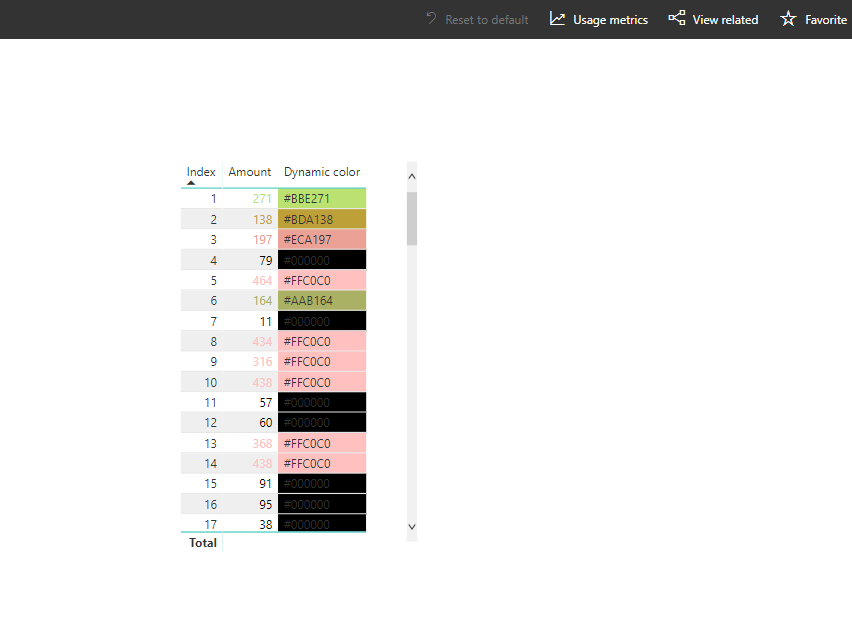
I'm using Conditional Formatting to color the background of some of my fields. First, I created a new Column:
Background Color = if(not(isblank(Table[Column Name])),
"#000000",
"#FFC0C0")Then I use Conditional Formatting to set the Background color of a particular field in my table using "Format by Field Value" and setting the field to the Background Color column I created above.
Great. That works perfectly. But when I publish to Power BI online, the color completely disappears. Using 'Edit Report in Power BI Online, I can see that nothing has changed - the field still has the same value for Conditional Formatting. So why doesn't it work?
Solved! Go to Solution.
Hi @Budfudder,
I can't produce your issue, it works on my side:
Can you please provide more detail about this?
Regards,
Xiaoxin Sheng
I'm not sure what more detail there is to supply. What other information would help?
If you have recently started exploring Fabric, we'd love to hear how it's going. Your feedback can help with product improvements.
A new Power BI DataViz World Championship is coming this June! Don't miss out on submitting your entry.
Share feedback directly with Fabric product managers, participate in targeted research studies and influence the Fabric roadmap.
| User | Count |
|---|---|
| 57 | |
| 33 | |
| 33 | |
| 19 | |
| 18 |
| User | Count |
|---|---|
| 68 | |
| 67 | |
| 45 | |
| 30 | |
| 28 |