Join us at FabCon Atlanta from March 16 - 20, 2026, for the ultimate Fabric, Power BI, AI and SQL community-led event. Save $200 with code FABCOMM.
Register now!The Power BI Data Visualization World Championships is back! Get ahead of the game and start preparing now! Learn more
Hello,
I'd like to add some conditional formatting to some productivity metrics.
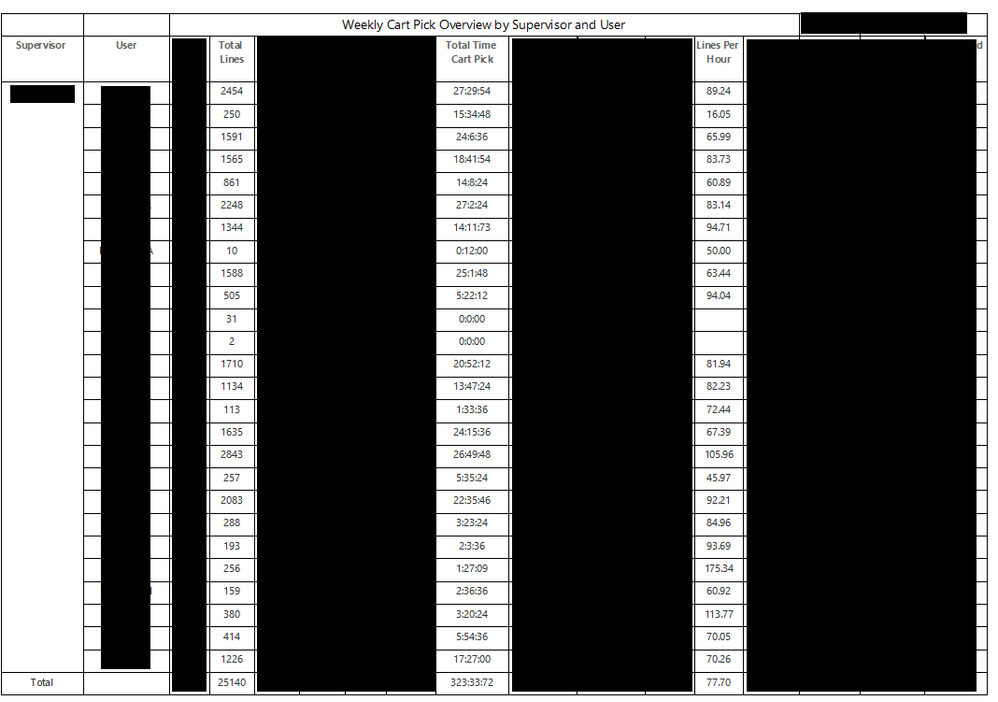
The "Lines Per Hour" column is an expression that divide the Total Lines by Total Time Cart Pick and the actual "Total" at the very bottom uses the exact same expression (Total Lines/Total Time Cart Pick).
Is there a way that I can reference the Average for all users (77.70) in this scenario in some conditional formatting for the "Lines Per Hour" column? If a user is below the total average, I'd like the cell to be red.
I'm toying around with Report Variables and Group Variables, but I'm not too familiar with SSRS so maybe I'm making this way more complicated than it needs to be.
Please provide sample data (with sensitive information removed) that covers your issue or question completely, in a usable format (not as a screenshot).
https://community.fabric.microsoft.com/t5/Community-Blog/How-to-provide-sample-data-in-the-Power-BI-...
Please show the expected outcome based on the sample data you provided.
https://community.fabric.microsoft.com/t5/Desktop/How-to-Get-Your-Question-Answered-Quickly/m-p/1447...
The Power BI Data Visualization World Championships is back! Get ahead of the game and start preparing now!
| User | Count |
|---|---|
| 39 | |
| 37 | |
| 33 | |
| 32 | |
| 29 |
| User | Count |
|---|---|
| 132 | |
| 86 | |
| 85 | |
| 68 | |
| 64 |