This time we’re going bigger than ever. Fabric, Power BI, SQL, AI and more. We're covering it all. You won't want to miss it.
Learn moreJoin the FabCon + SQLCon recap series. Up next: Power BI, Real-Time Intelligence, IQ and AI, and Data Factory take center stage. All sessions are available on-demand after the live show. Register now
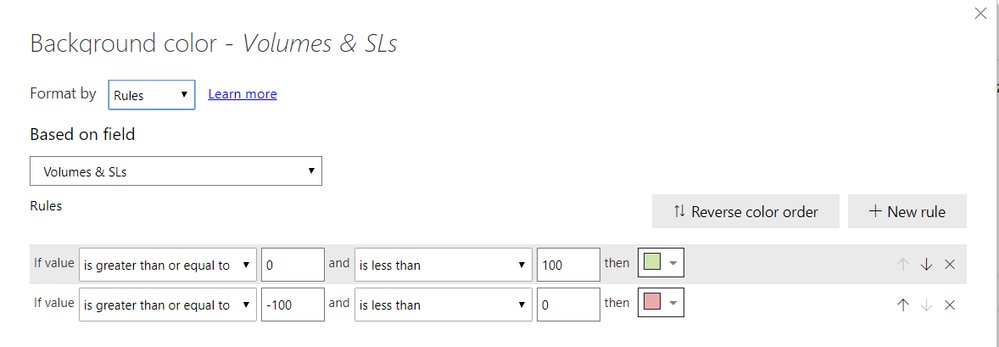
I'm trying to apply conditional formatting in a PBIX but it doesn't work, in File number 1:
But in file number 2:
Both measures are a calculated variance in percentage format, the formula I'm using is:
Example Formula =
VAR __BASELINE_VALUE = [Metric W-1]
VAR __VALUE_TO_COMPARE = [Metric]
RETURN
IF(NOT ISBLANK(__VALUE_TO_COMPARE),IF(DIVIDE(__VALUE_TO_COMPARE - __BASELINE_VALUE, __BASELINE_VALUE)>1,1,IF(DIVIDE(__VALUE_TO_COMPARE - __BASELINE_VALUE, __BASELINE_VALUE)<-1,-1,DIVIDE(__VALUE_TO_COMPARE - __BASELINE_VALUE, __BASELINE_VALUE))))
Any reason why the second PBIX it's not showing the same Conditional Formatting format?
Hi @Anonymous,
Have you nested other measures with specific filter functions in your formula that used in 'conditional formatting' feature? It is hard to troubleshooting from your snapshots and formula without any detail data. Can you please share a sample pbix file for test?
How to Get Your Question Answered Quickly
Notice: do mask on sensitive data.
Regards,
Xiaoxin Sheng
Let me do that, I'll attach a PBIX Example
I'll do it within a couple of hours, thanks for the reply
Check out the April 2026 Power BI update to learn about new features.
If you have recently started exploring Fabric, we'd love to hear how it's going. Your feedback can help with product improvements.
A new Power BI DataViz World Championship is coming this June! Don't miss out on submitting your entry.
| User | Count |
|---|---|
| 39 | |
| 37 | |
| 31 | |
| 23 | |
| 15 |
| User | Count |
|---|---|
| 76 | |
| 59 | |
| 32 | |
| 31 | |
| 26 |