cancel
Showing results for 
Search instead for 
Did you mean: 

The Power BI Data Visualization World Championships is back! Get ahead of the game and start preparing now! Learn more

Reply
HenryJS
Post Prodigy
Post Prodigy

Conditional Formatting: Highlight Date In Past

Hi all,


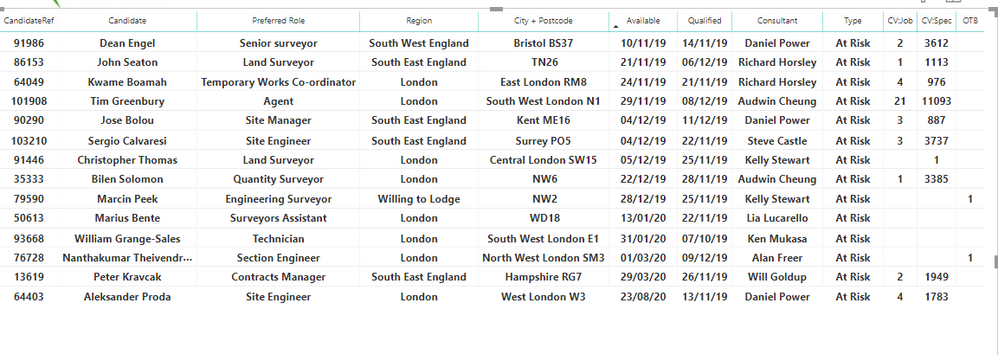
I would like to highlight cells where the 'Available' date is in the past below. 


How do I do this with conditional formatting?


1. Report

Available 1.PNG


2. Data

Available 2.PNG


Thanks,


Henry


1 ACCEPTED SOLUTION
amitchandak
Super User
Super User

Create a measure like

Color Date = if(FIRSTNONBLANK('Table'[Available],TODAY()) <today(),"lightgreen","red")


You can use white in else.

In the visualization pane -> Format -> Conditional formatting -> Backgound (Switch On) -> Advance option

Choose format by field value and choose this measure


Appreciate your Kudos. In case, this is the solution you are looking for, mark it as the Solution. In case it does not help, please provide additional information and mark me with @
Thanks. My Recent Blog -
https://community.powerbi.com/t5/Community-Blog/HR-Analytics-Active-Employee-Hire-and-Termination-tr...
https://community.powerbi.com/t5/Community-Blog/Power-BI-Working-with-Non-Standard-Time-Periods/ba-p...
https://community.powerbi.com/t5/Community-Blog/Comparing-Data-Across-Date-Ranges/ba-p/823601

Share with Power BI Enthusiasts: Full Power BI Video (20 Hours) YouTube
Microsoft Fabric Series 60+ Videos YouTube
Microsoft Fabric Hindi End to End YouTube

View solution in original post

3 REPLIES 3
amitchandak
Super User
Super User

Create a measure like

Color Date = if(FIRSTNONBLANK('Table'[Available],TODAY()) <today(),"lightgreen","red")


You can use white in else.

In the visualization pane -> Format -> Conditional formatting -> Backgound (Switch On) -> Advance option

Choose format by field value and choose this measure


Appreciate your Kudos. In case, this is the solution you are looking for, mark it as the Solution. In case it does not help, please provide additional information and mark me with @
Thanks. My Recent Blog -
https://community.powerbi.com/t5/Community-Blog/HR-Analytics-Active-Employee-Hire-and-Termination-tr...
https://community.powerbi.com/t5/Community-Blog/Power-BI-Working-with-Non-Standard-Time-Periods/ba-p...
https://community.powerbi.com/t5/Community-Blog/Comparing-Data-Across-Date-Ranges/ba-p/823601

Share with Power BI Enthusiasts: Full Power BI Video (20 Hours) YouTube
Microsoft Fabric Series 60+ Videos YouTube
Microsoft Fabric Hindi End to End YouTube
Anonymous
Not applicable

Hi


All you need to do is create a flag that checks if a date is in the past or not, and then use that for your conditional formatting.


Create a measure like 

Today = TODAY()

This measure will return todays date. Then in your data create a calculated column like

Today Flag = IF([Available] < [Today], 1, 0)

This will generate a column that will return a 1 for dates in the past, and 0 for dates that are either today or in the future.


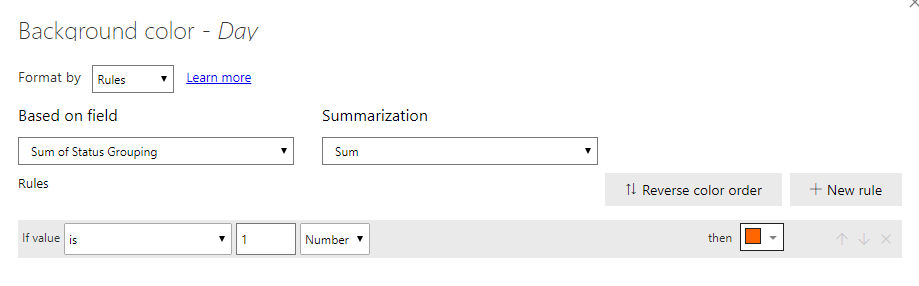
Then you simply apply conditional formatting in your table, using the sum of "Today Flag" to colour any date that = 1


condformat.PNG


If you need anymore help please let me know, otherwise please select this as your answer!


Good luck!

Excellent ! Just what I was looking for. Thank you very much.

Helpful resources

Announcements
November Power BI Update Carousel

Power BI Monthly Update - November 2025

Check out the November 2025 Power BI update to learn about new features.

Fabric Data Days Carousel

Fabric Data Days

Advance your Data & AI career with 50 days of live learning, contests, hands-on challenges, study groups & certifications and more!

FabCon Atlanta 2026 carousel

FabCon Atlanta 2026

Join us at FabCon Atlanta, March 16-20, for the ultimate Fabric, Power BI, AI and SQL community-led event. Save $200 with code FABCOMM.

Top Solution Authors
Top Kudoed Authors