Get certified for free when you join Fabric Data Days 2026 and dive into Fabric, Power BI, SQL, AI, and other essential data skills.
Join nowData Days is here! Join us now for 60+ days of learning, challenges, and connection. Learn more
Hi all,
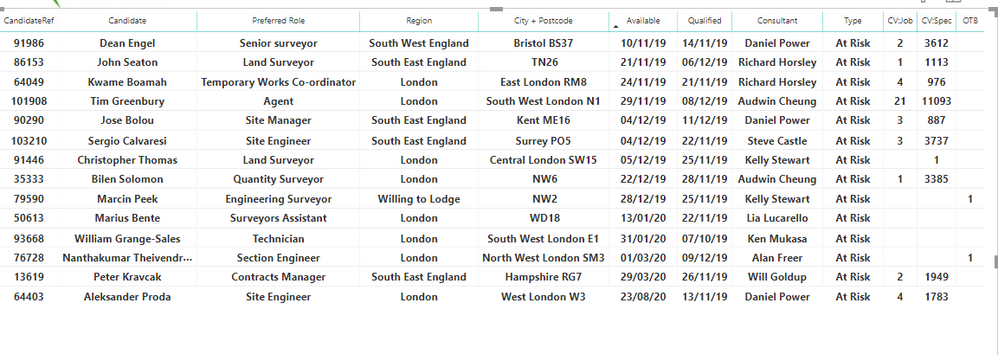
I would like to highlight cells where the 'Available' date is in the past below.
How do I do this with conditional formatting?
1. Report
2. Data
Thanks,
Henry
Solved! Go to Solution.
Create a measure like
Color Date = if(FIRSTNONBLANK('Table'[Available],TODAY()) <today(),"lightgreen","red")
You can use white in else.
In the visualization pane -> Format -> Conditional formatting -> Backgound (Switch On) -> Advance option
Choose format by field value and choose this measure
Appreciate your Kudos. In case, this is the solution you are looking for, mark it as the Solution. In case it does not help, please provide additional information and mark me with @
Thanks. My Recent Blog -
https://community.powerbi.com/t5/Community-Blog/HR-Analytics-Active-Employee-Hire-and-Termination-tr...
https://community.powerbi.com/t5/Community-Blog/Power-BI-Working-with-Non-Standard-Time-Periods/ba-p...
https://community.powerbi.com/t5/Community-Blog/Comparing-Data-Across-Date-Ranges/ba-p/823601
Create a measure like
Color Date = if(FIRSTNONBLANK('Table'[Available],TODAY()) <today(),"lightgreen","red")
You can use white in else.
In the visualization pane -> Format -> Conditional formatting -> Backgound (Switch On) -> Advance option
Choose format by field value and choose this measure
Appreciate your Kudos. In case, this is the solution you are looking for, mark it as the Solution. In case it does not help, please provide additional information and mark me with @
Thanks. My Recent Blog -
https://community.powerbi.com/t5/Community-Blog/HR-Analytics-Active-Employee-Hire-and-Termination-tr...
https://community.powerbi.com/t5/Community-Blog/Power-BI-Working-with-Non-Standard-Time-Periods/ba-p...
https://community.powerbi.com/t5/Community-Blog/Comparing-Data-Across-Date-Ranges/ba-p/823601
Hi
All you need to do is create a flag that checks if a date is in the past or not, and then use that for your conditional formatting.
Create a measure like
Today = TODAY()This measure will return todays date. Then in your data create a calculated column like
Today Flag = IF([Available] < [Today], 1, 0)This will generate a column that will return a 1 for dates in the past, and 0 for dates that are either today or in the future.
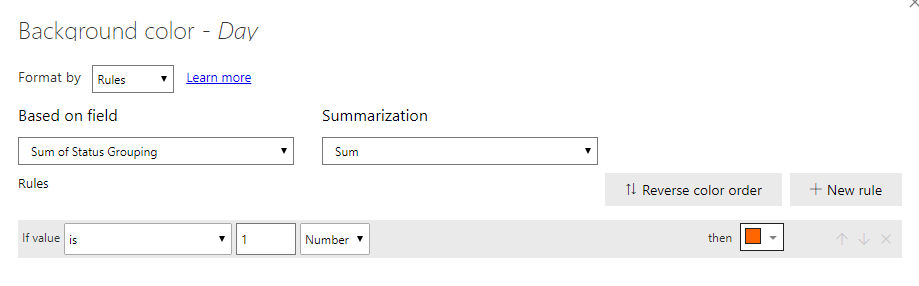
Then you simply apply conditional formatting in your table, using the sum of "Today Flag" to colour any date that = 1
If you need anymore help please let me know, otherwise please select this as your answer!
Good luck!
Excellent ! Just what I was looking for. Thank you very much.
Don't miss out on Data Days, June 15 through August 7. Learn Fabric, Power BI, SQL, AI and more.
Check out the May 2026 Power BI update to learn about new features.
| User | Count |
|---|---|
| 23 | |
| 23 | |
| 21 | |
| 20 | |
| 15 |
| User | Count |
|---|---|
| 58 | |
| 55 | |
| 43 | |
| 30 | |
| 24 |