Join us in Barcelona for FabCon and SQLCon, September 28 - October 1, 2026.
This is best Fabric, Power BI, SQL and AI community event. How do we know? The last event sold out! Save €200 with code FABCMTY200.
Register now- Power BI forums
- Get Help with Power BI
- Desktop
- Service
- Report Server
- Power Query
- Mobile Apps
- Developer
- DAX Commands and Tips
- Custom Visuals Development Discussion
- Health and Life Sciences
- Power BI Spanish forums
- Translated Spanish Desktop
- Training and Consulting
- Instructor Led Training
- Dashboard in a Day for Women, by Women
- Galleries
- Data Stories Gallery
- Themes Gallery
- Contests Gallery
- QuickViz Gallery
- Quick Measures Gallery
- Visual Calculations Gallery
- Fabric Apps Gallery
- Notebook Gallery
- Translytical Task Flow Gallery
- TMDL Gallery
- R Script Showcase
- Webinars and Video Gallery
- Ideas
- Custom Visuals Ideas (read-only)
- Issues
- Issues
- Events
- Upcoming Events
The Fabric community is now in read-only for platform upgrade. Learn more
- Power BI forums
- Forums
- Get Help with Power BI
- Desktop
- Re: Conditional Formatting Duplicate Records in Ro...
- Subscribe to RSS Feed
- Mark Topic as New
- Mark Topic as Read
- Float this Topic for Current User
- Bookmark
- Subscribe
- Printer Friendly Page

- Mark as New
- Bookmark
- Subscribe
- Mute
- Subscribe to RSS Feed
- Permalink
Conditional Formatting Duplicate Records in Rows
I've been researching this for hours and I've given up. What I need is simple. I just need to apply conditional formatting to any records that match a record in another row. I'm sure this is simple but I'm new to Power BI so I could use some guidance.
Here's an example of what I want it to look like. This is a table that shows users logged into computers and how many hours they've been logged in. I'd like to highlight the current user if they are logged into more than one system.

Solved! Go to Solution.


- Mark as New
- Bookmark
- Subscribe
- Mute
- Subscribe to RSS Feed
- Permalink
Hi,
If i understand it correctly than this should work.
Create a calculated column
CountDistinct =
VAR CountDistinct = Table[Current User]
RETURN

CALCULATE(
    COUNTROWS('Table'),
    ALL('Table'),
    Table[Current User] = CountDistinct
)
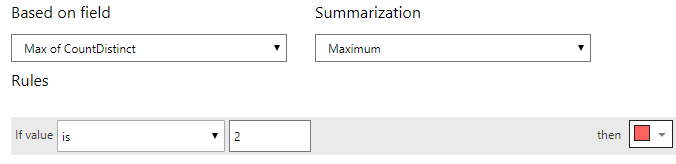
Replace the table and column with your own and in the conditional format on current use make it look like this
- Mark as New
- Bookmark
- Subscribe
- Mute
- Subscribe to RSS Feed
- Permalink
@Gordonlilj This will not work if there are more than 2 duplicates. How can I achieve this when I have more than 2 duplicates in data?
- Mark as New
- Bookmark
- Subscribe
- Mute
- Subscribe to RSS Feed
- Permalink
Hi,
If i understand it correctly than this should work.
Create a calculated column
CountDistinct =
VAR CountDistinct = Table[Current User]
RETURN

CALCULATE(
    COUNTROWS('Table'),
    ALL('Table'),
    Table[Current User] = CountDistinct
)
Replace the table and column with your own and in the conditional format on current use make it look like this

- Mark as New
- Bookmark
- Subscribe
- Mute
- Subscribe to RSS Feed
- Permalink
Hi, The given solution worked perfectly for me as well. Thanks for that. I am looking for a slight variant, if possible. Is it possible not to highlight only the first record?
- Mark as New
- Bookmark
- Subscribe
- Mute
- Subscribe to RSS Feed
- Permalink
Is there an easy way to ignore one particular computer from my table? There's a conference room computer so that's flagging as red but I want it to be ignored.
- Mark as New
- Bookmark
- Subscribe
- Mute
- Subscribe to RSS Feed
- Permalink
Sure, all you would need to do is put the code inside an IF statement such as
CountDistinct =
IF(Table1[System] ="Com5",1,
VAR CountDistinct = Table1[Current User]
RETURN

CALCULATE(
    COUNTROWS('Table1'),
    ALL('Table1'),
    Table1[Current User] = CountDistinct
))
- Mark as New
- Bookmark
- Subscribe
- Mute
- Subscribe to RSS Feed
- Permalink
That worked to get rid of the conference room computer but I also need it to remove the formatting from the other computer that the person is logged into. In other words, even though the conference room computer is no longer highlighted, the other computer that the user is logged into is still highlighted in red.
- Mark as New
- Bookmark
- Subscribe
- Mute
- Subscribe to RSS Feed
- Permalink
Would this be a simple command to add?
- Mark as New
- Bookmark
- Subscribe
- Mute
- Subscribe to RSS Feed
- Permalink
It probably would be simple but could you provide some more sample data? So i could understand the issue better and provide a correct solution
- Mark as New
- Bookmark
- Subscribe
- Mute
- Subscribe to RSS Feed
- Permalink
Thank you so much! That worked perfectly
Helpful resources

FabCon & SQLCon – Barcelona 2026
Join us in Barcelona for FabCon and SQLCon, the Fabric, Power BI, SQL, and AI community event. Save €200 with code FABCMTY200.

Power BI DataViz World Championships - June 2026
A new Power BI DataViz World Championship is coming this June! Don't miss out on submitting your entry.

| User | Count |
|---|---|
| 21 | |
| 21 | |
| 14 | |
| 14 | |
| 13 |


| User | Count |
|---|---|
| 47 | |
| 35 | |
| 24 | |
| 20 | |
| 19 |


