This time we’re going bigger than ever. Fabric, Power BI, SQL, AI and more. We're covering it all. You won't want to miss it.
Learn moreLevel up your Power BI skills this month - build one visual each week and tell better stories with data! Get started
Hey Guys,
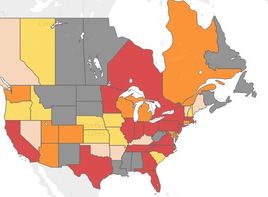
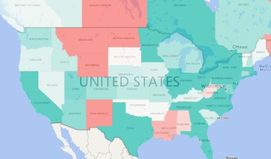
I'm trying to recreate a map I made in tableau last year in Power BI. I used conditional formatting to set a range of values equal to a color (if x >1million, then "red"). I put the raw data in power bi (the map on the right) and was able to make diverging values, which is cool, but not giving me the level of insight I want. Is there a way I can assign a range to a color on a map? Would it be possible to create a measure or column then make it a color in the color saturdation field? Additionally, is there a way to remove the map detail so we just see the state shapes?
Thank you all for your assistance. Been enjoying the conversion to Power BI, but finding I still have a lot to learn.
-Eric
@massaker If I understand you correctly you just want to make the different colors more defined. You could accomplish this by using the legend. This assumes that the colors have meanings.
Another avenue to pursue would to use the color saturation field as well to see if the levels change to deeper tones.
Thank you Eno. Yes, the colors correspond to $ brackets. 1-100k is gray, 100k-250k is the light peach, and so on to Red which is 1m+.
Now I'm wondering how to define those in the legend? Do I need to create a new column or measure to define the buckets? I tried creating an if statement (if <100k, True, else False). But that didn't seem to work. Any recommendations?
Sign up to receive a private message when registration opens and key events begin.
If you have recently started exploring Fabric, we'd love to hear how it's going. Your feedback can help with product improvements.
| User | Count |
|---|---|
| 31 | |
| 24 | |
| 23 | |
| 20 | |
| 16 |
| User | Count |
|---|---|
| 63 | |
| 38 | |
| 28 | |
| 23 | |
| 22 |