Join us at FabCon Atlanta from March 16 - 20, 2026, for the ultimate Fabric, Power BI, AI and SQL community-led event. Save $200 with code FABCOMM.
Register now!Vote for your favorite vizzies from the Power BI Dataviz World Championship submissions. Vote now!
Hi @diogobraga2 ,
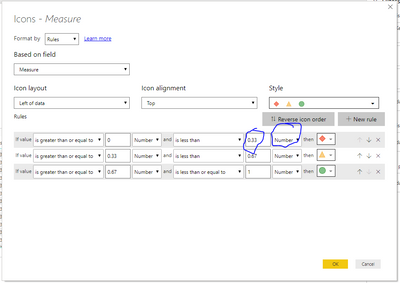
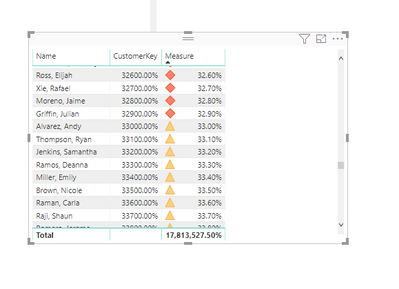
See my top picture, save your rule as decimals, and use number. I forget why this works this way, but there is a reason. Something to do with percentage meaning a percentage of all your values.
Let me know if you have any questions.
If this solves your issues, please mark it as the solution, so that others can find it easily. Kudos 👍are nice too.
Nathaniel
Proud to be a Super User!
Thank you. The decimal switch fixed my map as well.
Hi @diogobraga2 ,
See my top picture, save your rule as decimals, and use number. I forget why this works this way, but there is a reason. Something to do with percentage meaning a percentage of all your values.
Let me know if you have any questions.
If this solves your issues, please mark it as the solution, so that others can find it easily. Kudos 👍are nice too.
Nathaniel
Proud to be a Super User!
It worked, thanks! Now, how do I make the same conditonal formatting apply to the total???
Hello @diogobraga2 ,
You are welcome!
https://docs.microsoft.com/en-us/power-bi/desktop-conditional-table-formatting
There are a few considerations to keep in mind when working with conditional table formatting:
Proud to be a Super User!
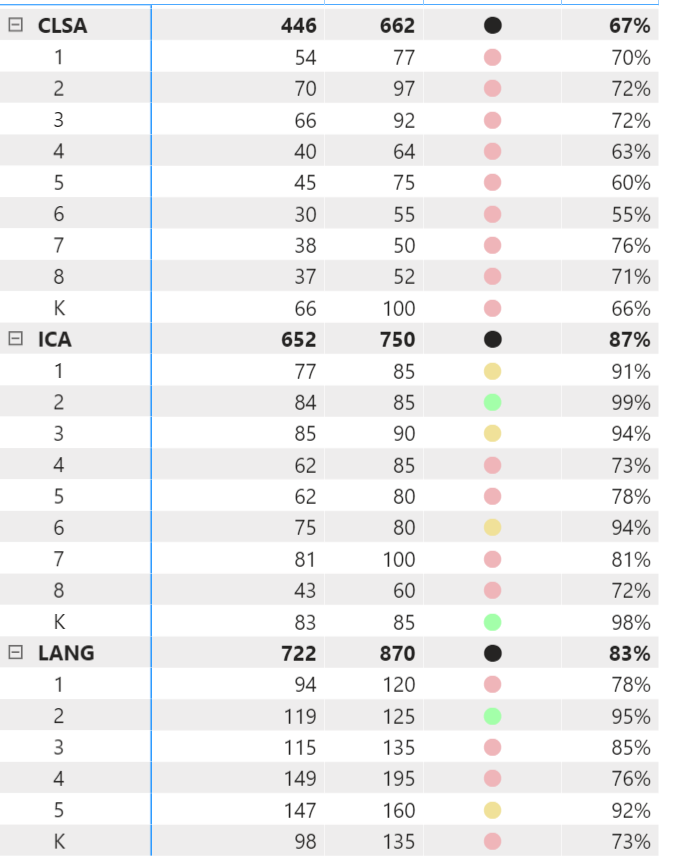
Thanks for sharing, are you aware of any workarounds or tricks to fix this? The total in this dataset represents schools, and I need to find a way to flag it as well.
Vote for your favorite vizzies from the Power BI World Championship submissions!
If you love stickers, then you will definitely want to check out our Community Sticker Challenge!
Check out the January 2026 Power BI update to learn about new features.
| User | Count |
|---|---|
| 63 | |
| 51 | |
| 41 | |
| 23 | |
| 18 |
| User | Count |
|---|---|
| 130 | |
| 111 | |
| 48 | |
| 30 | |
| 28 |