Join us at FabCon Atlanta from March 16 - 20, 2026, for the ultimate Fabric, Power BI, AI and SQL community-led event. Save $200 with code FABCOMM.
Register now!The Power BI Data Visualization World Championships is back! Get ahead of the game and start preparing now! Learn more
Hi!
I am trying to create a conditional column to label the row either day or night depending on the time of the day. For example, between 00:00 - 7:00 I want to label as Night and 7:30 - 23:30 I want to label as Day.
I have tried to do it by saying "if it is greater than or equal to" etc but they all came up as Night. Where am I going wrong? Is it easier to write a calculated column?
Thanks for your help in advance!! 🙂
Solved! Go to Solution.
Hi @Anonymous ,
Based on my test, you could refer to below steps:
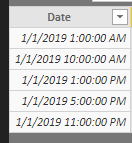
Sample data:
Create below calculated column:
Lable =
IF (
HOUR ( 'Table1'[Date] ) >= 0
&& HOUR ( 'Table1'[Date] ) <= 7,
"Night",
IF (
TIME ( HOUR ( 'Table1'[Date] ), MINUTE ( 'Table1'[Date] ), MINUTE ( 'Table1'[Date] ) )
>= TIME ( 7, 30, 0 )
&& TIME ( HOUR ( 'Table1'[Date] ), MINUTE ( 'Table1'[Date] ), MINUTE ( 'Table1'[Date] ) )
<= TIME ( 23, 30, 0 ),
"Day"
)
)
Result:
You could also download the pbix file to have a view.
Regards,
Daniel He
Hi @Anonymous ,
Based on my test, you could refer to below steps:
Sample data:
Create below calculated column:
Lable =
IF (
HOUR ( 'Table1'[Date] ) >= 0
&& HOUR ( 'Table1'[Date] ) <= 7,
"Night",
IF (
TIME ( HOUR ( 'Table1'[Date] ), MINUTE ( 'Table1'[Date] ), MINUTE ( 'Table1'[Date] ) )
>= TIME ( 7, 30, 0 )
&& TIME ( HOUR ( 'Table1'[Date] ), MINUTE ( 'Table1'[Date] ), MINUTE ( 'Table1'[Date] ) )
<= TIME ( 23, 30, 0 ),
"Day"
)
)
Result:
You could also download the pbix file to have a view.
Regards,
Daniel He
The Power BI Data Visualization World Championships is back! Get ahead of the game and start preparing now!
| User | Count |
|---|---|
| 41 | |
| 40 | |
| 33 | |
| 29 | |
| 27 |
| User | Count |
|---|---|
| 131 | |
| 105 | |
| 60 | |
| 56 | |
| 55 |